Keystrokes captured when upgrading from ITM 6.3.0.1 to ITM 6.3.0.2
This does not involve removing the previous existing version of ITPA, rather just installing ITPA 6.3.0.2 on top of the existing previous version.
( Here, I had OS Agent installed - so you will see references to the OS agent in the logs )
------X------------ Cut and Paste of the Installation Transcript ------ X---
Script command is started on Fri Oct 18 13:14:20 2013.
# pwd
/Desktop/itpa_630fp2
# pwd
/Desktop/itpa_630fp2
# ls
AUTORUN.INF WINDOWS license reports typescript
DeployLnk.sh install.sh non_ibm_license samples unix
README.TXT kcirunas.cfg notices scripts
# ./install.sh
INSTALL
Enter the name of the IBM Tivoli Monitoring directory
[ default = /opt/IBM/ITM ]:
ITM home directory "/opt/IBM/ITM" already exists.
OK to use it [ 1-yes, 2-no; "1" is default ]?
The Manage Tivoli Enterprise Monitoring Services is running in the background, please close it before continuing.
Continue with this installation [ 1-yes, 2-no; "1" is default ]? 1
The following processes are currently running:
Product = Tivoli Enterprise Monitoring Server PID = 5505126
Product = Performance Analyzer PID = 6750436
Product = IBM Eclipse Help Server PID = 4784486
Product = Tivoli Enterprise Portal Server PID = 7995770
Product = Monitoring Agent for UNIX OS PID = 9175252
install.sh warning: Existing products found to be running will be restarted during installation., continuing ...
Continue with this installation [ 1-yes, 2-no; "1" is default ]? 1
Processing. Please wait...
Stopping Tivoli Enterprise Portal Server ...
Product Tivoli Enterprise Portal Server was stopped gracefully.
Product IBM Eclipse Help Server was stopped gracefully.
Agent stopped...
Processing. Please wait...
Stopping Watchdog process...
Watchdog process was stopped.
Stopping Monitoring Agent for UNIX OS ...
Product Monitoring Agent for UNIX OS was stopped gracefully.
Agent stopped...
Processing. Please wait...
Stopping Tivoli Performance Analyzer ...
Product Tivoli Performance Analyzer was stopped gracefully.
Agent stopped...
Stopping TEMS...
It can take up to ten minutes.
TEMS stopped...
/opt/IBM/ITM
KCI1362W IBM Tivoli Monitoring version 6.3 introduces a number of platform improvements which may require operating system updates. It is important that you ensure this system meets these requirements prior to installing or updating your installation. Please refer to the following technote for more information: http://www.ibm.com/support/docview.wss?uid=swg21623341
Select one of the following:
1) Install products to the local host.
2) Install products to depot for remote deployment (requires TEMS).
3) Install TEMS support for remote seeding
4) Exit install.
Please enter a valid number: 1
Initializing ...
International Program License Agreement
Part 1 - General Terms
BY DOWNLOADING, INSTALLING, COPYING, ACCESSING, CLICKING ON
AN "ACCEPT" BUTTON, OR OTHERWISE USING THE PROGRAM,
LICENSEE AGREES TO THE TERMS OF THIS AGREEMENT. IF YOU ARE
ACCEPTING THESE TERMS ON BEHALF OF LICENSEE, YOU REPRESENT
AND WARRANT THAT YOU HAVE FULL AUTHORITY TO BIND LICENSEE
TO THESE TERMS. IF YOU DO NOT AGREE TO THESE TERMS,
* DO NOT DOWNLOAD, INSTALL, COPY, ACCESS, CLICK ON AN
"ACCEPT" BUTTON, OR USE THE PROGRAM; AND
* PROMPTLY RETURN THE UNUSED MEDIA, DOCUMENTATION, AND
Press Enter to continue viewing the license agreement, or
enter "1" to accept the agreement, "2" to decline it, "3"
to print it, "4" to read non-IBM terms, or "99" to go back
to the previous screen.
1
Product packages are available in /Desktop/itpa_630fp2/unix
The following products are currently installed in "/opt/IBM/ITM":
Agentless Monitoring for AIX Operating Systems V06.30.01.00 @ AIX R5.2 (64 bit)/R6.1, R7.1 (64 bit)
Agentless Monitoring for AIX Operating Systems V06.30.02.00 @ Tivoli Enterprise Portal Browser Client support
Agentless Monitoring for AIX Operating Systems V06.30.02.00 @ Tivoli Enterprise Portal Server support
Agentless Monitoring for HP-UX Operating Systems V06.30.01.00 @ AIX R5.2 (64 bit)/R6.1, R7.1 (64 bit)
Agentless Monitoring for HP-UX Operating Systems V06.30.02.00 @ Tivoli Enterprise Portal Browser Client support
Agentless Monitoring for HP-UX Operating Systems V06.30.02.00 @ Tivoli Enterprise Portal Server support
Agentless Monitoring for Linux Operating Systems V06.30.01.00 @ AIX R5.2 (64 bit)/R6.1, R7.1 (64 bit)
Agentless Monitoring for Linux Operating Systems V06.30.02.00 @ Tivoli Enterprise Portal Browser Client support
Agentless Monitoring for Linux Operating Systems V06.30.02.00 @ Tivoli Enterprise Portal Server support
Agentless Monitoring for Solaris Operating Systems V06.30.01.00 @ AIX R5.2 (64 bit)/R6.1, R7.1 (64 bit)
Agentless Monitoring for Solaris Operating Systems V06.30.02.00 @ Tivoli Enterprise Portal Browser Client support
Agentless Monitoring for Solaris Operating Systems V06.30.02.00 @ Tivoli Enterprise Portal Server support
Agentless Monitoring for Windows Operating Systems V06.30.01.00 @ AIX R5.2 (64 bit)/R6.1, R7.1 (64 bit)
Agentless Monitoring for Windows Operating Systems V06.30.02.00 @ Tivoli Enterprise Portal Browser Client support
Agentless Monitoring for Windows Operating Systems V06.30.02.00 @ Tivoli Enterprise Portal Server support
IBM Eclipse Help Server V06.30.02.00 @ AIX R6.1, R7.1 (32 bit)/R6.1, R7.1 (64 bit)
IBM GSKit Security Interface V08.00.50.05 @ AIX R5.2 (32 bit)/R6.1, R7.1 (32 bit)
IBM GSKit Security Interface V08.00.50.05 @ AIX R5.2 (64 bit)/R6.1, R7.1 (64 bit)
IBM HTTP Server V08.00.06.00 @ AIX R6.1, R7.1 (64 bit)
IBM Installation Manager V01.06.03.01 @ AIX R6.1, R7.1 (32 bit)/R6.1, R7.1 (64 bit)
IBM Tivoli Enterprise Portal Server Extensions V08.00.06.00 @ AIX R6.1, R7.1 (64 bit)
Monitoring Agent for IBM Tivoli Monitoring 5.x Endpoint V06.23.03.00 @ Tivoli Enterprise Portal Server support
Monitoring Agent for Linux OS V06.30.02.00 @ Tivoli Enterprise Portal Browser Client support
Monitoring Agent for Linux OS V06.30.02.00 @ Tivoli Enterprise Portal Server support
Monitoring Agent for UNIX Logs V06.23.03.00 @ Tivoli Enterprise Portal Browser Client support
Monitoring Agent for UNIX Logs V06.23.03.00 @ Tivoli Enterprise Portal Server support
Monitoring Agent for UNIX OS V06.30.01.00 @ AIX R5.2 (64 bit)/R6.1, R7.1 (64 bit)
Monitoring Agent for UNIX OS V06.30.02.00 @ Tivoli Enterprise Portal Browser Client support
Monitoring Agent for UNIX OS V06.30.02.00 @ Tivoli Enterprise Portal Server support
Monitoring Agent for Windows OS V06.30.02.00 @ Tivoli Enterprise Portal Browser Client support
Monitoring Agent for Windows OS V06.30.02.00 @ Tivoli Enterprise Portal Server support
Monitoring Agent for i5/OS V06.30.02.00 @ Tivoli Enterprise Portal Browser Client support
Monitoring Agent for i5/OS V06.30.02.00 @ Tivoli Enterprise Portal Server support
Performance Analyzer Domain for DB2 V06.30.01.00 @ Tivoli Performance Analyzer Domain support
Performance Analyzer Domain for ITCAM RT V06.30.01.00 @ Tivoli Performance Analyzer Domain support
Performance Analyzer Domain for OS agent V06.30.01.00 @ Tivoli Enterprise Portal Browser Client support
Performance Analyzer Domain for OS agent V06.30.01.00 @ Tivoli Enterprise Portal Server support
Performance Analyzer Domain for OS agent V06.30.01.00 @ Tivoli Performance Analyzer Domain support
Performance Analyzer Domain for Oracle V06.30.01.00 @ Tivoli Performance Analyzer Domain support
Performance Analyzer Domain for System p V06.30.01.00 @ Tivoli Performance Analyzer Domain support
Performance Analyzer Domain for VMware V06.30.01.00 @ Tivoli Performance Analyzer Domain support
Summarization and Pruning Agent V06.30.02.00 @ AIX R6.1, R7.1 (64 bit)
Summarization and Pruning Agent V06.30.02.00 @ Tivoli Enterprise Portal Browser Client support
Summarization and Pruning Agent V06.30.02.00 @ Tivoli Enterprise Portal Server support
TEC GUI Integration V06.30.02.00 @ Tivoli Enterprise Portal Browser Client support
TEC GUI Integration V06.30.02.00 @ Tivoli Enterprise Portal Server support
Tivoli Enterprise Monitoring Automation Server V06.30.02.00 @ AIX R6.1, R7.1 (64 bit)
Tivoli Enterprise Monitoring SOAP Server V06.30.02.00 @ AIX R6.1, R7.1 (64 bit)
Tivoli Enterprise Monitoring Server V06.30.02.00 @ AIX R6.1, R7.1 (64 bit)
Tivoli Enterprise Portal Browser Client V06.30.02.00 @ AIX R6.1, R7.1 (64 bit)
Tivoli Enterprise Portal Server V06.30.02.00 @ AIX R6.1, R7.1 (64 bit)
Tivoli Enterprise Services User Interface Extensions V06.30.02.00 @ AIX R6.1, R7.1 (64 bit)
Tivoli Enterprise Services User Interface V06.30.02.00 @ AIX R5.2 (64 bit)/R6.1, R7.1 (64 bit)
Tivoli Enterprise Services User Interface V06.30.02.00 @ AIX R6.1, R7.1 (32 bit)
Tivoli Enterprise Services User Interface V06.30.02.00 @ AIX R6.1, R7.1 (64 bit)
Tivoli Performance Analyzer V06.30.02.00 @ AIX R6.1, R7.1 (32 bit)/R6.1, R7.1 (64 bit)
Tivoli Performance Analyzer V06.30.02.00 @ Tivoli Enterprise Portal Browser Client support
Tivoli Performance Analyzer V06.30.02.00 @ Tivoli Enterprise Portal Server support
Universal Agent V06.23.03.00 @ Tivoli Enterprise Portal Browser Client support
Universal Agent V06.23.03.00 @ Tivoli Enterprise Portal Server support
Warehouse Proxy V06.30.02.00 @ AIX R6.1, R7.1 (64 bit)
Warehouse Proxy V06.30.02.00 @ Tivoli Enterprise Portal Browser Client support
Warehouse Proxy V06.30.02.00 @ Tivoli Enterprise Portal Server support
All agents require that application support files that contain agent-specific information be installed on the Tivoli Enterprise Monitoring Server that the agents will connect to, Tivoli Enterprise Portal Server and Tivoli Enterprise Portal desktop and browser client. Install application support before starting to install any Tivoli Enterprise Monitoring Agents.
KCIIN2463W Warning: This installation media does not contain any components which can be run on the current system platform architecture. To install components which can run on this system, please locate the installation media containing files similiar to *aix5*.jar.
NOTE: IF YOU ARE INSTALLING APPLICATION SUPPORT, CONTINUE WITH THE INSTALLATION TO SEE A LIST OF SUPPORT FILES.
Press Enter to continue, or type 'q' to quit:
Product packages are available for the following operating systems and component support categories:
1) Tivoli Enterprise Portal Browser Client support
2) Tivoli Enterprise Portal Server support
3) Tivoli Performance Analyzer Domain support
4) Tivoli Enterprise Monitoring Server support
Type the number for the OS you want, or type "q" to quit selection: 1
You selected number "1" or "Tivoli Enterprise Portal Browser Client support"
Is the selection correct [ 1=Yes, 2=No ; default is "1" ] ? 1
The following application supports are available for installation:
1) Performance Analyzer Domain for DB2 V06.30.02.00
2) Performance Analyzer Domain for ITCAM RT V06.30.02.00
3) Performance Analyzer Domain for OS agent V06.30.02.00
4) Performance Analyzer Domain for Oracle V06.30.02.00
5) Performance Analyzer Domain for System p V06.30.02.00
6) Performance Analyzer Domain for VMware V06.30.02.00
7) all of the above
Type the numbers that correspond to the products that you want to install. Type "b" to change operating system, or type "q" to quit selection.
If you enter more than one number, separate the numbers by a comma or a space.
Type your selections here: 7
The following products will be installed:
Performance Analyzer Domain for DB2 V06.30.02.00
Performance Analyzer Domain for ITCAM RT V06.30.02.00
Performance Analyzer Domain for OS agent V06.30.02.00
Performance Analyzer Domain for Oracle V06.30.02.00
Performance Analyzer Domain for System p V06.30.02.00
Performance Analyzer Domain for VMware V06.30.02.00
Are your selections correct [ 1=Yes, 2=No ; default is "1" ] ? 1
KCIIN2387E
ERROR - "Performance Analyzer Domain for DB2 V06.30.02.00" could not be installed because the following pre-requisite products are missing from this CD media:
Tivoli Enterprise Portal Browser Client support IBM Tivoli Composite Application Manager Agent for DB2 V620R100
Do you want to continue with the installation [ 1=Yes, 2=No ; default is "2" ] ? 1
KCIIN2387E
ERROR - "Performance Analyzer Domain for ITCAM RT V06.30.02.00" could not be installed because the following pre-requisite products are missing from this CD media:
Tivoli Enterprise Portal Browser Client support ITCAM for Client Response Time V620R100
Tivoli Enterprise Portal Browser Client support ITCAM for Robotic Response Time V620R100
Tivoli Enterprise Portal Browser Client support ITCAM for Web Response Time V620R100
Do you want to continue with the installation [ 1=Yes, 2=No ; default is "2" ] ? 1
... installing "Performance Analyzer Domain for OS agent V06.30.02.00 for Tivoli Enterprise Portal Browser Client support"; please wait.
=> installed "Performance Analyzer Domain for OS agent V06.30.02.00 for Tivoli Enterprise Portal Browser Client support".
... Initializing component Performance Analyzer Domain for OS agent V06.30.02.00 for Tivoli Enterprise Portal Browser Client support.
... Performance Analyzer Domain for OS agent V06.30.02.00 for Tivoli Enterprise Portal Browser Client support initialized.
KCIIN2387E
ERROR - "Performance Analyzer Domain for Oracle V06.30.02.00" could not be installed because the following pre-requisite products are missing from this CD media:
Tivoli Enterprise Portal Browser Client support IBM Tivoli Composite Application Manager Agent for Oracle Database V620R100
Do you want to continue with the installation [ 1=Yes, 2=No ; default is "2" ] ? 1
KCIIN2387E
ERROR - "Performance Analyzer Domain for System p V06.30.02.00" could not be installed because the following pre-requisite products are missing from this CD media:
Tivoli Enterprise Portal Browser Client support Premium Monitoring Agent for AIX V620R100
Tivoli Enterprise Portal Browser Client support Premium Monitoring Agent for VIOS V620R100
Do you want to continue with the installation [ 1=Yes, 2=No ; default is "2" ] ? 1
KCIIN2387E
ERROR - "Performance Analyzer Domain for VMware V06.30.02.00" could not be installed because the following pre-requisite products are missing from this CD media:
Tivoli Enterprise Portal Browser Client support IBM Tivoli Monitoring for Virtual Servers V620R100
Do you want to continue with the installation [ 1=Yes, 2=No ; default is "2" ] ? 1
Do you want to install additional products or product support packages [ 1=Yes, 2=No ; default is "2" ] ? 1
KCIIN2463W Warning: This installation media does not contain any components which can be run on the current system platform architecture. To install components which can run on this system, please locate the installation media containing files similiar to *aix5*.jar.
NOTE: IF YOU ARE INSTALLING APPLICATION SUPPORT, CONTINUE WITH THE INSTALLATION TO SEE A LIST OF SUPPORT FILES.
Press Enter to continue, or type 'q' to quit:
Product packages are available for the following operating systems and component support categories:
1) Tivoli Enterprise Portal Browser Client support
2) Tivoli Enterprise Portal Server support
3) Tivoli Performance Analyzer Domain support
4) Tivoli Enterprise Monitoring Server support
Type the number for the OS you want, or type "q" to quit selection: 2
You selected number "2" or "Tivoli Enterprise Portal Server support"
Is the selection correct [ 1=Yes, 2=No ; default is "1" ] ? 1
The following application supports are available for installation:
1) Performance Analyzer Domain for DB2 V06.30.02.00
2) Performance Analyzer Domain for ITCAM RT V06.30.02.00
3) Performance Analyzer Domain for OS agent V06.30.02.00
4) Performance Analyzer Domain for Oracle V06.30.02.00
5) Performance Analyzer Domain for System p V06.30.02.00
6) Performance Analyzer Domain for VMware V06.30.02.00
7) all of the above
Type the numbers that correspond to the products that you want to install. Type "b" to change operating system, or type "q" to quit selection.
If you enter more than one number, separate the numbers by a comma or a space.
Type your selections here: 7
The following products will be installed:
Performance Analyzer Domain for DB2 V06.30.02.00
Performance Analyzer Domain for ITCAM RT V06.30.02.00
Performance Analyzer Domain for OS agent V06.30.02.00
Performance Analyzer Domain for Oracle V06.30.02.00
Performance Analyzer Domain for System p V06.30.02.00
Performance Analyzer Domain for VMware V06.30.02.00
Are your selections correct [ 1=Yes, 2=No ; default is "1" ] ? 1
KCIIN2387E
ERROR - "Performance Analyzer Domain for DB2 V06.30.02.00" could not be installed because the following pre-requisite products are missing from this CD media:
Tivoli Enterprise Portal Server support IBM Tivoli Composite Application Manager Agent for DB2 V620R100
Do you want to continue with the installation [ 1=Yes, 2=No ; default is "2" ] ? 1
KCIIN2387E
ERROR - "Performance Analyzer Domain for ITCAM RT V06.30.02.00" could not be installed because the following pre-requisite products are missing from this CD media:
Tivoli Enterprise Portal Server support ITCAM for Client Response Time V620R100
Tivoli Enterprise Portal Server support ITCAM for Robotic Response Time V620R100
Tivoli Enterprise Portal Server support ITCAM for Web Response Time V620R100
Do you want to continue with the installation [ 1=Yes, 2=No ; default is "2" ] ? 1
... installing "Performance Analyzer Domain for OS agent V06.30.02.00 for Tivoli Enterprise Portal Server support"; please wait.
=> installed "Performance Analyzer Domain for OS agent V06.30.02.00 for Tivoli Enterprise Portal Server support".
... Initializing component Performance Analyzer Domain for OS agent V06.30.02.00 for Tivoli Enterprise Portal Server support.
... Performance Analyzer Domain for OS agent V06.30.02.00 for Tivoli Enterprise Portal Server support initialized.
KCIIN2387E
ERROR - "Performance Analyzer Domain for Oracle V06.30.02.00" could not be installed because the following pre-requisite products are missing from this CD media:
Tivoli Enterprise Portal Server support IBM Tivoli Composite Application Manager Agent for Oracle Database V620R100
Do you want to continue with the installation [ 1=Yes, 2=No ; default is "2" ] ? 1
KCIIN2387E
ERROR - "Performance Analyzer Domain for System p V06.30.02.00" could not be installed because the following pre-requisite products are missing from this CD media:
Tivoli Enterprise Portal Server support Premium Monitoring Agent for AIX V620R100
Tivoli Enterprise Portal Server support Premium Monitoring Agent for VIOS V620R100
Do you want to continue with the installation [ 1=Yes, 2=No ; default is "2" ] ? 1
KCIIN2387E
ERROR - "Performance Analyzer Domain for VMware V06.30.02.00" could not be installed because the following pre-requisite products are missing from this CD media:
Tivoli Enterprise Portal Server support IBM Tivoli Monitoring for Virtual Servers V620R100
Do you want to continue with the installation [ 1=Yes, 2=No ; default is "2" ] ? 1
Do you want to install additional products or product support packages [ 1=Yes, 2=No ; default is "2" ] ? 1
KCIIN2463W Warning: This installation media does not contain any components which can be run on the current system platform architecture. To install components which can run on this system, please locate the installation media containing files similiar to *aix5*.jar.
NOTE: IF YOU ARE INSTALLING APPLICATION SUPPORT, CONTINUE WITH THE INSTALLATION TO SEE A LIST OF SUPPORT FILES.
Press Enter to continue, or type 'q' to quit:
Product packages are available for the following operating systems and component support categories:
1) Tivoli Enterprise Portal Browser Client support
2) Tivoli Enterprise Portal Server support
3) Tivoli Performance Analyzer Domain support
4) Tivoli Enterprise Monitoring Server support
Type the number for the OS you want, or type "q" to quit selection: 3
You selected number "3" or "Tivoli Performance Analyzer Domain support"
Is the selection correct [ 1=Yes, 2=No ; default is "1" ] ? 1
The following application supports are available for installation:
1) Performance Analyzer Domain for DB2 V06.30.02.00
2) Performance Analyzer Domain for ITCAM RT V06.30.02.00
3) Performance Analyzer Domain for OS agent V06.30.02.00
4) Performance Analyzer Domain for Oracle V06.30.02.00
5) Performance Analyzer Domain for System p V06.30.02.00
6) Performance Analyzer Domain for VMware V06.30.02.00
7) all of the above
Type the numbers that correspond to the products that you want to install. Type "b" to change operating system, or type "q" to quit selection.
If you enter more than one number, separate the numbers by a comma or a space.
Type your selections here: 7
The following products will be installed:
Performance Analyzer Domain for DB2 V06.30.02.00
Performance Analyzer Domain for ITCAM RT V06.30.02.00
Performance Analyzer Domain for OS agent V06.30.02.00
Performance Analyzer Domain for Oracle V06.30.02.00
Performance Analyzer Domain for System p V06.30.02.00
Performance Analyzer Domain for VMware V06.30.02.00
Are your selections correct [ 1=Yes, 2=No ; default is "1" ] ? 1
... installing "Performance Analyzer Domain for DB2 V06.30.02.00 for Tivoli Performance Analyzer Domain support"; please wait.
=> installed "Performance Analyzer Domain for DB2 V06.30.02.00 for Tivoli Performance Analyzer Domain support".
... Initializing component Performance Analyzer Domain for DB2 V06.30.02.00 for Tivoli Performance Analyzer Domain support.
... Performance Analyzer Domain for DB2 V06.30.02.00 for Tivoli Performance Analyzer Domain support initialized.
... installing "Performance Analyzer Domain for ITCAM RT V06.30.02.00 for Tivoli Performance Analyzer Domain support"; please wait.
=> installed "Performance Analyzer Domain for ITCAM RT V06.30.02.00 for Tivoli Performance Analyzer Domain support".
... Initializing component Performance Analyzer Domain for ITCAM RT V06.30.02.00 for Tivoli Performance Analyzer Domain support.
... Performance Analyzer Domain for ITCAM RT V06.30.02.00 for Tivoli Performance Analyzer Domain support initialized.
... installing "Performance Analyzer Domain for OS agent V06.30.02.00 for Tivoli Performance Analyzer Domain support"; please wait.
=> installed "Performance Analyzer Domain for OS agent V06.30.02.00 for Tivoli Performance Analyzer Domain support".
... Initializing component Performance Analyzer Domain for OS agent V06.30.02.00 for Tivoli Performance Analyzer Domain support.
... Performance Analyzer Domain for OS agent V06.30.02.00 for Tivoli Performance Analyzer Domain support initialized.
... installing "Performance Analyzer Domain for Oracle V06.30.02.00 for Tivoli Performance Analyzer Domain support"; please wait.
=> installed "Performance Analyzer Domain for Oracle V06.30.02.00 for Tivoli Performance Analyzer Domain support".
... Initializing component Performance Analyzer Domain for Oracle V06.30.02.00 for Tivoli Performance Analyzer Domain support.
... Performance Analyzer Domain for Oracle V06.30.02.00 for Tivoli Performance Analyzer Domain support initialized.
... installing "Performance Analyzer Domain for System p V06.30.02.00 for Tivoli Performance Analyzer Domain support"; please wait.
=> installed "Performance Analyzer Domain for System p V06.30.02.00 for Tivoli Performance Analyzer Domain support".
... Initializing component Performance Analyzer Domain for System p V06.30.02.00 for Tivoli Performance Analyzer Domain support.
... Performance Analyzer Domain for System p V06.30.02.00 for Tivoli Performance Analyzer Domain support initialized.
... installing "Performance Analyzer Domain for VMware V06.30.02.00 for Tivoli Performance Analyzer Domain support"; please wait.
=> installed "Performance Analyzer Domain for VMware V06.30.02.00 for Tivoli Performance Analyzer Domain support".
... Initializing component Performance Analyzer Domain for VMware V06.30.02.00 for Tivoli Performance Analyzer Domain support.
... Performance Analyzer Domain for VMware V06.30.02.00 for Tivoli Performance Analyzer Domain support initialized.
Do you want to install additional products or product support packages [ 1=Yes, 2=No ; default is "2" ] ? 1
KCIIN2463W Warning: This installation media does not contain any components which can be run on the current system platform architecture. To install components which can run on this system, please locate the installation media containing files similiar to *aix5*.jar.
NOTE: IF YOU ARE INSTALLING APPLICATION SUPPORT, CONTINUE WITH THE INSTALLATION TO SEE A LIST OF SUPPORT FILES.
Press Enter to continue, or type 'q' to quit:
Product packages are available for the following operating systems and component support categories:
1) Tivoli Enterprise Portal Browser Client support
2) Tivoli Enterprise Portal Server support
3) Tivoli Performance Analyzer Domain support
4) Tivoli Enterprise Monitoring Server support
Type the number for the OS you want, or type "q" to quit selection: 4
You selected number "4" or "Tivoli Enterprise Monitoring Server support"
Is the selection correct [ 1=Yes, 2=No ; default is "1" ] ? 1
The following application supports are available for installation:
1) Performance Analyzer Domain for DB2 V06.30.02.00
2) Performance Analyzer Domain for ITCAM RT V06.30.02.00
3) Performance Analyzer Domain for OS agent V06.30.02.00
4) Performance Analyzer Domain for Oracle V06.30.02.00
5) Performance Analyzer Domain for System p V06.30.02.00
6) Performance Analyzer Domain for VMware V06.30.02.00
7) all of the above
Type the numbers that correspond to the products that you want to install. Type "b" to change operating system, or type "q" to quit selection.
If you enter more than one number, separate the numbers by a comma or a space.
Type your selections here: 7
The following products will be installed:
Performance Analyzer Domain for DB2 V06.30.02.00
Performance Analyzer Domain for ITCAM RT V06.30.02.00
Performance Analyzer Domain for OS agent V06.30.02.00
Performance Analyzer Domain for Oracle V06.30.02.00
Performance Analyzer Domain for System p V06.30.02.00
Performance Analyzer Domain for VMware V06.30.02.00
Are your selections correct [ 1=Yes, 2=No ; default is "1" ] ? 1
KCIIN2387E
ERROR - "TMS Performance Analyzer Domain for DB2 V06.30.02.00" could not be installed because the following pre-requisite products are missing from this CD media:
TMS IBM Tivoli Composite Application Manager Agent for DB2 V620R100
Do you want to continue with the installation [ 1=Yes, 2=No ; default is "2" ] ? 1
KCIIN2387E
ERROR - "TMS Performance Analyzer Domain for ITCAM RT V06.30.02.00" could not be installed because the following pre-requisite products are missing from this CD media:
TMS ITCAM for Client Response Time V620R100
TMS ITCAM for Robotic Response Time V620R100
TMS ITCAM for Web Response Time V620R100
Do you want to continue with the installation [ 1=Yes, 2=No ; default is "2" ] ? 1
... installing "Performance Analyzer Domain for OS agent V06.30.02.00 for Tivoli Enterprise Monitoring Server support"; please wait.
=> installed "Performance Analyzer Domain for OS agent V06.30.02.00 for Tivoli Enterprise Monitoring Server support".
... Initializing component Performance Analyzer Domain for OS agent V06.30.02.00 for Tivoli Enterprise Monitoring Server support.
... Performance Analyzer Domain for OS agent V06.30.02.00 for Tivoli Enterprise Monitoring Server support initialized.
KCIIN2387E
ERROR - "TMS Performance Analyzer Domain for Oracle V06.30.02.00" could not be installed because the following pre-requisite products are missing from this CD media:
TMS IBM Tivoli Composite Application Manager Agent for Oracle Database V620R100
Do you want to continue with the installation [ 1=Yes, 2=No ; default is "2" ] ? 1
KCIIN2387E
ERROR - "TMS Performance Analyzer Domain for System p V06.30.02.00" could not be installed because the following pre-requisite products are missing from this CD media:
TMS Premium Monitoring Agent for AIX V620R100
TMS Premium Monitoring Agent for VIOS V620R100
Do you want to continue with the installation [ 1=Yes, 2=No ; default is "2" ] ? 1
KCIIN2387E
ERROR - "TMS Performance Analyzer Domain for VMware V06.30.02.00" could not be installed because the following pre-requisite products are missing from this CD media:
TMS IBM Tivoli Monitoring for Virtual Servers V620R100
Do you want to continue with the installation [ 1=Yes, 2=No ; default is "2" ] ? 1
Do you want to install additional products or product support packages [ 1=Yes, 2=No ; default is "2" ] ?
... postprocessing; please wait.
... running /opt/IBM/ITM/aix536/cq/bin/helpmerg.sh
... finished postprocessing.
Installation step complete.
Following Tivoli Enterprise Monitoring Server product support were installed:
*) Performance Analyzer Domain for OS agent
*) Tivoli Performance Analyzer
Note: This operation causes the monitoring server to restart.
Do you want to seed product support on the Tivoli Enterprise Monitoring Server? [ 1=Yes, 2=No ; default is "1" ] ?
Starting TEMS...
TEMS started...
The following previously seeded Tivoli Enterprise Monitoring Server product support packages will be re-seeded:
*) Performance Analyzer Domain for OS agent
*) Tivoli Performance Analyzer
Choose one of the following options to add or update the situation distribution definition to include the default managed system groups:
1) ALL - This option adds the default managed system groups to all the applicable situations. Note that not all situations have the default managed group setting. For some, you might need to manually define the distribution in the Tivoli Enterprise Portal due to the specific content of the agent support package.
2) NONE - The default managed system group is not added to any situation.
Type your selections here [ number "2" or "NONE" is default ]:
Seeding support for Performance Analyzer Domain for OS agent [1 of 2]
Product support seeding completed...
Seeding support for Tivoli Performance Analyzer [2 of 2]
Product support seeding completed...
Stopping TEMS...
TEMS stopped...
All supports successfully seeded.
Automatic start at system initialization has been configured.
You must manually configure automatic stop at system shutdown. Create or modify /etc/rc.shutdown to invoke the command '/etc/rc.itm2 stop'. Refer to AIX documentation for more information about /etc/rc.shutdown.
The install.sh command creates most of directories and files with world write permissions. IBM Tivoli Monitoring provides the secureMain utility to helps you keep the monitoring environment secured. You can secure this installation now or manually execute the secureMain utility later. For more information see Appendix G. Securing your IBM Tivoli Monitoring installation on Linux or UNIX in the IBM Tivoli Monitoring Installation and Setup Guide.
Do you want to secure this IBM Tivoli Monitoring installation [ 1-yes, 2-no; "2" is default ]?
Starting TEMS...
It can take up to ten minutes.
TEMS started...
Processing. Please wait...
Starting Tivoli Performance Analyzer ...
Tivoli Performance Analyzer started
Processing. Please wait...
Starting Tivoli Enterprise Portal Server ...
Eclipse Help Server is required by Tivoli Enterprise Portal Server (TEPS) and will be started...
Eclipse Help Server was successfully started
Tivoli Enterprise Portal Server started
Processing. Please wait...
Starting Monitoring Agent for UNIX OS ...
Monitoring Agent for UNIX OS started
you have mail in /usr/spool/mail/root
# exit
Friday, October 18, 2013

Thursday, September 19, 2013
How the confidence in Performance Analyzer is calculated.
This blog explains how the confidence in PA is being calculated.
Often times you will see the value varying even though you have good range of data being calculated.
The confidence value depends on the values in the TDW for the analytical task being calculated, and if the values are varying then the confidence will proportionately vary.
Higher the variance - lower the confidence.
Likewise - if the values are close to each other - then the confidence will come up close or higher than 90%/
( the other way I look at it is, if I know that the values are same or approximately the same each time the reading was taken and If I can select that range in the PA config window - then I can get a good confidence value , but for this I need to know what are the values in the Tivoli Data Warehouse )
Below is my experiment on Average Memory Utilization Analytical task for 11 days and is captured below on how I was able to increase the confidence by hand editing or simulating good data.
This is not dependent on the number of samples - but on the values.
--
Before:
I have 11 day worth of data for the Average Memory free, with varying values - and the calculated confidence was 25, since the "average memory free" was varying as shown below.

The snap shot below is the TDW data contents, The column on the left is the day representation split as follows 1 - 13 - 09 - 06 -23-date,
( i.e Sep 6th 2013 and upto Sep 18th 2013. )

--
After:
Now, let's change the value to a constant for all the days - by hand -editing the value in the TDW to 369.45 and watch that the Confidence goes to 100.

Watch the confidence jump to 100

Some supporting notes :
This was tested on RHEL 5. and DB2 housing the TDW, and all PA analytical tasks were running
To enable a quicker visual - I had to turn the analytical task to run every minute and watched the <ITM LOGS>kpacma.log so that it would refresh faster.
Often times you will see the value varying even though you have good range of data being calculated.
The confidence value depends on the values in the TDW for the analytical task being calculated, and if the values are varying then the confidence will proportionately vary.
Higher the variance - lower the confidence.
Likewise - if the values are close to each other - then the confidence will come up close or higher than 90%/
( the other way I look at it is, if I know that the values are same or approximately the same each time the reading was taken and If I can select that range in the PA config window - then I can get a good confidence value , but for this I need to know what are the values in the Tivoli Data Warehouse )
Below is my experiment on Average Memory Utilization Analytical task for 11 days and is captured below on how I was able to increase the confidence by hand editing or simulating good data.
This is not dependent on the number of samples - but on the values.
--
Before:
I have 11 day worth of data for the Average Memory free, with varying values - and the calculated confidence was 25, since the "average memory free" was varying as shown below.

The snap shot below is the TDW data contents, The column on the left is the day representation split as follows 1 - 13 - 09 - 06 -23-date,
( i.e Sep 6th 2013 and upto Sep 18th 2013. )

--
After:
Now, let's change the value to a constant for all the days - by hand -editing the value in the TDW to 369.45 and watch that the Confidence goes to 100.

Watch the confidence jump to 100

Some supporting notes :
This was tested on RHEL 5. and DB2 housing the TDW, and all PA analytical tasks were running
To enable a quicker visual - I had to turn the analytical task to run every minute and watched the <ITM LOGS>kpacma.log so that it would refresh faster.
Tuesday, September 17, 2013
Selecting range of data to calculate the Confidence in Tivoli Performance Analyzer.
The confidence of the data for the Performance Analyzer for the task attributes are based on the inputs for the domain from the Tivoli Data Warehouse.
This confidence is listed in the TEP GUI whenever the user opts to view the analysis of the attribute computed by the Performance Analyzer.
e.g: Let;s say the user wants to view the CPU performance of a certain configured agent, ( Assuming that the historical collection was setup ), data will show up as graphs and charts along with forecast and status details.
User would like to see the confidence in the data as well - This is calculated based on the Least Square Regression algorithm ( which I will try not to get into here )
The confidence is great when there are no breaks in data. but low when there is disruption of data and so on.
Here I will go about how to change the calculation in the Tivoli Performance Analyzer Configuration window - on how to select a set of data for this calculation.
Open the PA configuration window and I have picked the CPU Utilization for Linux as my demo.
Click on "Add constraint " in the PA configuration button -> Input tab as shown below.

Click on "Add Constraint" and in this example I am tweaking the CPU Utilization ( Linux ) and you can change or choose and pick the attributes based on your business needs. I chose the "Linux CPU Averages" -> and "Time Stamp" and chose the range I wanted to start computing the data collection.

I suggest a couple of tries - trial and error to get the confidence level showing up to your business needs.
First option is to just add one constraint, and once you are familiar - you can add multiple constraints and set the date range.
Here are some samples that I tried. ( you can experiment it based on this and then use a scheme that fits )
- Set the Granularity to "Hourly"
- Click on Add Constraint -> Chose Linux CPU Averages and "Time Stamp"
- Click on the window just below the Time stamp and chose the date ( in my case I said 'let's get all data from Sep 16th 12:00 )
- Click on Apply. This should set the task when run to pick data from Sep 16th onwards.
- let the task run.
Some more tips to see the results faster. ( this is optional - but just a suggestion )
1. Set the task to run every often ( I tried running it every minute ) just to see the reaction.

2. Turn the debugging on from Info to Debug - so that I was able to see the logs when the task ran. ( this is optional - but just a suggestion )
If you do this - then remember to stop and start the PA agent ( itmcmd agent stop pa and start pa )
AgentIdUniqueId__file=local.cfg
ConsolePassword__file=local.cfg
DisableVACM=true
EngineBoots__file=local.cfg
LogCount=3
LogFile=/opt/IBM/ITM/logs/kpacma.log
LogLevel=Debug <==============
LogSize=10000000
NotificationQueueLimit=50
UdpPort=-1
3. View the traces - kpacma.log, ( this is optional - but just a suggestion )
This is what shows up when the task is run, Here I set the 2 constraints from the front end to watch for everything from 7:00 PM to 8:00 PM on the 16th Sep 2013.
The 1130916190000000
= 1 -13-09-16---19-00-00
= Ignore the first digit, 2013 Sep 16, 7:00 PM
likewise the
'1130916120000000'
is
1-13-09-16-20-00 00 essentially 8 PM.
( There will be just 1 timestamp if there is 1 constraint configured. )


Another example : 2013 Sep 16 12;00 AM to 7 PM
2013-09-17 03:12:09: SELECT "Linux_CPU_Averages_HV"."AVG_CPU_Usage_Moving_Average" , "Linux_CPU_Averages_HV"."Timestamp" , "Linux_CPU_Averages_HV"."TMZDIFF" , "Linux_CPU_Averages_HV"."Timestamp" , "Linux_CPU_Averages_HV"."TMZDIFF" , "Linux_CPU_Averages_HV"."System_Name" , "Linux_CPU_Averages_HV"."System_Name" , "Linux_CPU_Averages_HV".WRITETIME , "Linux_CPU_Averages_HV"."TMZDIFF" FROM itmuser."Linux_CPU_Averages_HV" "Linux_CPU_Averages_HV" WHERE "Linux_CPU_Averages_HV"."System_Name" IN ( 'nc9118041057:LZ') AND ("Linux_CPU_Averages_HV"."Timestamp" > '1130916000000000') AND ("Linux_CPU_Averages_HV"."Timestamp" < '1130916190000000') ORDER BY "Linux_CPU_Averages_HV"."System_Name" , "Linux_CPU_Averages_HV".WRITETIME
2013-09-17 03:12:09: All 19 measurement(s) processed and found 1 result(s)


Things to watch:
- See that you hit the Apply button after making changes to the constraints so that the rule gets applied.
- The "Forecast Overlay" panel in the GUI - does not change the graphs to the "From date" and the "End date". Only the calculations of the confidence, strength and number of records change.
- Check that the task is set to something reasonable time frame so that you can watch the effects of the changes. ( I tried it for every minute - once I got it running - changed the run interval back to the original setting )
- to check if the data is being pulled enable the logging , stop start agent and trace the kpacma.log . The logs can get big if you have a lot of tasks running and difficult to watch. so try greping appropriate task and the server.
Hope this small tutorial helped.
This confidence is listed in the TEP GUI whenever the user opts to view the analysis of the attribute computed by the Performance Analyzer.
e.g: Let;s say the user wants to view the CPU performance of a certain configured agent, ( Assuming that the historical collection was setup ), data will show up as graphs and charts along with forecast and status details.
User would like to see the confidence in the data as well - This is calculated based on the Least Square Regression algorithm ( which I will try not to get into here )
The confidence is great when there are no breaks in data. but low when there is disruption of data and so on.
Here I will go about how to change the calculation in the Tivoli Performance Analyzer Configuration window - on how to select a set of data for this calculation.
Open the PA configuration window and I have picked the CPU Utilization for Linux as my demo.
Click on "Add constraint " in the PA configuration button -> Input tab as shown below.

Click on "Add Constraint" and in this example I am tweaking the CPU Utilization ( Linux ) and you can change or choose and pick the attributes based on your business needs. I chose the "Linux CPU Averages" -> and "Time Stamp" and chose the range I wanted to start computing the data collection.

I suggest a couple of tries - trial and error to get the confidence level showing up to your business needs.
First option is to just add one constraint, and once you are familiar - you can add multiple constraints and set the date range.
Here are some samples that I tried. ( you can experiment it based on this and then use a scheme that fits )
- Set the Granularity to "Hourly"
- Click on Add Constraint -> Chose Linux CPU Averages and "Time Stamp"
- Click on the window just below the Time stamp and chose the date ( in my case I said 'let's get all data from Sep 16th 12:00 )
- Click on Apply. This should set the task when run to pick data from Sep 16th onwards.
- let the task run.
Some more tips to see the results faster. ( this is optional - but just a suggestion )
1. Set the task to run every often ( I tried running it every minute ) just to see the reaction.

2. Turn the debugging on from Info to Debug - so that I was able to see the logs when the task ran. ( this is optional - but just a suggestion )
If you do this - then remember to stop and start the PA agent ( itmcmd agent stop pa and start pa )
AgentIdUniqueId__file=local.cfg
ConsolePassword__file=local.cfg
DisableVACM=true
EngineBoots__file=local.cfg
LogCount=3
LogFile=/opt/IBM/ITM/logs/kpacma.log
LogLevel=Debug <==============
LogSize=10000000
NotificationQueueLimit=50
UdpPort=-1
3. View the traces - kpacma.log, ( this is optional - but just a suggestion )
This is what shows up when the task is run, Here I set the 2 constraints from the front end to watch for everything from 7:00 PM to 8:00 PM on the 16th Sep 2013.
The 1130916190000000
= 1 -13-09-16---19-00-00
= Ignore the first digit, 2013 Sep 16, 7:00 PM
likewise the
'1130916120000000'
is
1-13-09-16-20-00 00 essentially 8 PM.
( There will be just 1 timestamp if there is 1 constraint configured. )


Another example : 2013 Sep 16 12;00 AM to 7 PM
2013-09-17 03:12:09: SELECT "Linux_CPU_Averages_HV"."AVG_CPU_Usage_Moving_Average" , "Linux_CPU_Averages_HV"."Timestamp" , "Linux_CPU_Averages_HV"."TMZDIFF" , "Linux_CPU_Averages_HV"."Timestamp" , "Linux_CPU_Averages_HV"."TMZDIFF" , "Linux_CPU_Averages_HV"."System_Name" , "Linux_CPU_Averages_HV"."System_Name" , "Linux_CPU_Averages_HV".WRITETIME , "Linux_CPU_Averages_HV"."TMZDIFF" FROM itmuser."Linux_CPU_Averages_HV" "Linux_CPU_Averages_HV" WHERE "Linux_CPU_Averages_HV"."System_Name" IN ( 'nc9118041057:LZ') AND ("Linux_CPU_Averages_HV"."Timestamp" > '1130916000000000') AND ("Linux_CPU_Averages_HV"."Timestamp" < '1130916190000000') ORDER BY "Linux_CPU_Averages_HV"."System_Name" , "Linux_CPU_Averages_HV".WRITETIME
2013-09-17 03:12:09: All 19 measurement(s) processed and found 1 result(s)


Things to watch:
- See that you hit the Apply button after making changes to the constraints so that the rule gets applied.
- The "Forecast Overlay" panel in the GUI - does not change the graphs to the "From date" and the "End date". Only the calculations of the confidence, strength and number of records change.
- Check that the task is set to something reasonable time frame so that you can watch the effects of the changes. ( I tried it for every minute - once I got it running - changed the run interval back to the original setting )
- to check if the data is being pulled enable the logging , stop start agent and trace the kpacma.log . The logs can get big if you have a lot of tasks running and difficult to watch. so try greping appropriate task and the server.
Hope this small tutorial helped.
Monday, September 16, 2013
PA - Analysis of "Total Number of Measurements" on the TEP Client for the Performance Analyzer task.
The calculation of the number of records for the task (in this case I will discuss the CPU Utilization and for Linux ) for "Total Measurements" is coming from Tivoli Data Warehouse.
The blog explains how this came about and what are the other possible measurements that can be obtained in the Performance Analyzer
A snapshot of the TEP Client showing the Performance Analyzer tasks is shown below.

To double check this, login to the Database ( in this case DB2 ) and run this query for CPU Utilization for Summarized data for Hourly.
connect to WAREHOUS
select count(*) from itmuser."Linux_CPU_Averages_H"

But before this - one has to check to what granularity has the user configured the task measurements in the PA configuration window.
For this - open the Performance Analyzer configuration and view the granularity. (here it is set to Hourly - so the query will be
Linux_CPU_Averages_H
Had the granularity been set to Daily - then the query would have a suffix of "D", Likewise a granularity set to "Weekly, then the query would have a suffix of "W" and so on.

The blog explains how this came about and what are the other possible measurements that can be obtained in the Performance Analyzer
A snapshot of the TEP Client showing the Performance Analyzer tasks is shown below.
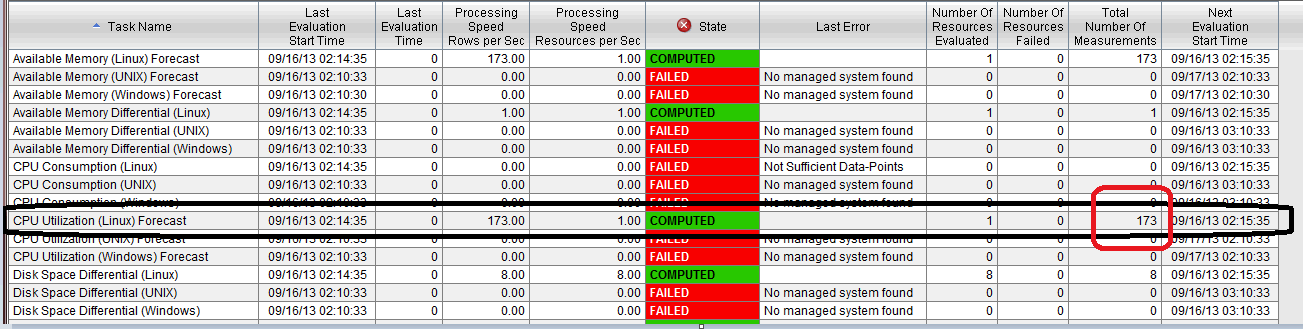
To double check this, login to the Database ( in this case DB2 ) and run this query for CPU Utilization for Summarized data for Hourly.
connect to WAREHOUS
select count(*) from itmuser."Linux_CPU_Averages_H"

But before this - one has to check to what granularity has the user configured the task measurements in the PA configuration window.
For this - open the Performance Analyzer configuration and view the granularity. (here it is set to Hourly - so the query will be
Linux_CPU_Averages_H
Had the granularity been set to Daily - then the query would have a suffix of "D", Likewise a granularity set to "Weekly, then the query would have a suffix of "W" and so on.

Thursday, September 12, 2013
paconf.jar - export/createDB/ execSQL
Often times there is a need for recreating the Performance Analyzer configuration Database.
Here I will write about some of my experiments with the command.
The command line to run it is ( on linux 64 bit ) ( first cd to the folder where the paconf.jar is present )
/opt/IBM/ITM/JRE/li6263/bin/java -cp paconf.jar:/opt/IBM/ITM/classes/kjrall.jar:/opt/ibm/db2/V9.7/java/db2jcc.jar:/opt/ibm/db2/V9.7/java/db2jcc_license_cu.jar com.ibm.tivoli.pa.config.PAConfigMain
The various options are :
java -jar paconf.jar [-export {taskfile} [-domain domainCode] |-createDB|-destroyDB|-cleanInitDB|-gui|-bareExecSQL|-execSQL taskfile-updateTables]
-export Export tasks to a file. Default to: kpa_tasks.sql. Optional -domain parameter specifies which domain tasks shoud be exported. Use 000 to export tasks not assigned to any domain.
-createDB Create the PA DB if it is not there
-destroyDB Drop all tables in TEPS DB created by ITPA
-cleanInitDB Re-create the PA DB. Same as -destroyDB then -createDB
-gui Bring up the bare bone GUI (not fully functional
-bareExecSQL Executing SQL statements from specified file. Tasks active/inactive state will not be preserved.
-execSQL Executing SQL statements from specified file. Tasks active/inactive state will be preserved.
-updateTables Update tables to the latest version (create nonexisting ones)
-gui - does not work ( not complete )
My experiments have been with mostly -execSQL, -createDB, -cleanInitDB
-createDB on a RHEL 64 bit: ( this will zap the contents of the tables to 0, all tables will be created though empty. )
java -jar paconf.jar [-export {taskfile} [-domain domainCode] |-createDB|-destroyDB|-cleanInitDB|-gui|-bareExecSQL|-execSQL taskfile-updateTables]
-export Export tasks to a file. Default to: kpa_tasks.sql. Optional -domain parameter specifies which domain tasks shoud be exported. Use 000 to export tasks not assigned to any domain.
-createDB Create the PA DB if it is not there
-destroyDB Drop all tables in TEPS DB created by ITPA
-cleanInitDB Re-create the PA DB. Same as -destroyDB then -createDB
-gui Bring up the bare bone GUI (not fully functional
-bareExecSQL Executing SQL statements from specified file. Tasks active/inactive state will not be preserved.
-execSQL Executing SQL statements from specified file. Tasks active/inactive state will be preserved.
-updateTables Update tables to the latest version (create nonexisting ones)
-gui - does not work ( not complete )
My experiments have been with mostly -execSQL, -createDB, -cleanInitDB
-createDB on a RHEL 64 bit: ( this will zap the contents of the tables to 0, all tables will be created though empty. )
/opt/IBM/ITM/JRE/li6263/bin/java -cp paconf.jar:/opt/IBM/ITM/classes/kjrall.jar:/opt/ibm/db2/V9.7/java/db2jcc.jar:/opt/ibm/db2/V9.7/java/db2jcc_license_cu.jar com.ibm.tivoli.pa.config.PAConfigMain -createDB
-destroyDB will drop the tables ( select count(*) from itmuser."KPATASKS" will say SQL0204N "ITMUSER.KPATASKS" is an undefined name. SQLSTATE=42704
/opt/IBM/ITM/JRE/li6263/bin/java -cp paconf.jar:/opt/IBM/ITM/classes/kjrall.jar:/opt/ibm/db2/V9.7/java/db2jcc.jar:/opt/ibm/db2/V9.7/java/db2jcc_license_cu.jar com.ibm.tivoli.pa.config.PAConfigMain -destroyDB
-cleanInitDB /opt/IBM/ITM/JRE/li6263/bin/java -cp paconf.jar:/opt/IBM/ITM/classes/kjrall.jar:/opt/ibm/db2/V9.7/java/db2jcc.jar:/opt/ibm/db2/V9.7/java/db2jcc_license_cu.jar com.ibm.tivoli.pa.config.PAConfigMain -cleanInitDB
(not much help here )
-updateTables ( not operational )
On windows ( 64 bit - 6.2.3 FP1 )
On ITM 6.3.0 ( change the java search string to Java70 below )
If we are using the Oracle 12c - suggest use ojdbc7.jar
The -gui option does not work.
c:\ibm\itm\java\java60\jre\bin\java -cp c:\IBM\ITM\TMAITM6\paconf.jar;c:\IBM\ITM\TMAITM6\kjrall.jar;c:\downloads\ojdbc6.jar com.ibm.tivoli.pa.config.PAConfigMain -gui
On a windows 64 bit ITM 6.3.0 (oracle 12c ) // java is changed. oracle 6 was changed to 7.
c:\ibm\itm\java\java70\jre\bin\java -cp c:\IBM\ITM\TMAITM6\paconf.jar;c:\IBM\ITM\TMAITM6\kjrall.jar;c:\downloads\ojdbc7.jar com.ibm.tivoli.pa.config.PAConfigMain -createDB
This fails with this message.
c:\Downloads>c:\ibm\itm\java\java70\jre\bin\java -cp c:\IBM\ITM\TMAITM6\paconf.j
ar;c:\IBM\ITM\TMAITM6\kjrall.jar;c:\downloads\ojdbc7.jar com.ibm.tivoli.pa.confi
g.PAConfigMain -createDB
Mar 14, 2014 5:42:52 AM com.ibm.tivoli.pa.config.PAConfigMain process
INFO: Check if config DB already exists for PA...
Mar 14, 2014 5:42:52 AM com.ibm.tivoli.pa.config.data.DBAccessor connect
WARNING: java.sql.SQLException: Listener refused the connection with the followi
ng error:
ORA-12519, TNS:no appropriate service handler found
Mar 14, 2014 5:42:52 AM com.ibm.tivoli.pa.config.data.DBAccessor connect
WARNING: Java class path used: c:\IBM\ITM\TMAITM6\paconf.jar;c:\IBM\ITM\TMAITM6\
kjrall.jar;c:\downloads\ojdbc7.jar
Mar 14, 2014 5:42:52 AM com.ibm.tivoli.pa.config.PAConfigMain process
INFO: Done
Exporting the contents of the Performance Analyzer Configuration Data.
This is on RHEL 32 bit.
1. cd to /opt/IBM/ITM/li6263/pa/bin ( /ITM/<arch>/pa/bin folder )
2. Get the location of where the DB2 drivers are ? and also the location of the paconf.jar , cd to that folder before executing the export command.
This is a cut and paste - but you would make necessary file location changes of the DB2 and the PA Jar files.
Look at the last option - it is the export that does the activity of pulling data out and dumps to kpa_tasks.sql
/opt/IBM/ITM/JRE/li6263/bin/java -cp paconf.jar:/opt/IBM/ITM/classes/kjrall.jar:/opt/ibm/db2/V9.7/java/db2jcc.jar:/opt/ibm/db2/V9.7/java/db2jcc_license_cu.jar com.ibm.tivoli.pa.config.PAConfigMain -export
3.Troubleshooting -
- check that you are executing from the same folder where the paconf.jar is ( ls -l paconf.jar )
- check that the path to the DB2 drivers are right in the command ?
4. On successful completion
Sep 12, 2013 4:12:42 AM com.ibm.tivoli.pa.config.PAConfigMain process
INFO: Exporting tasks from DB. This may take a minute...
Sep 12, 2013 4:12:42 AM com.ibm.tivoli.pa.config.data.FileTaskStorage exportDB <==check this line - for troubleshooting .
INFO: exporting tasks from DB
Sep 12, 2013 4:12:44 AM com.ibm.tivoli.pa.config.PAConfigMain process
INFO: Export completed: Thu Sep 12 04:12:44 CDT 2013
5. Check that the file kpa_tasks.sql is having the sql commands (approx 23K lines )
6. Now do the clean up and cleanInitDB
Pre-deletion.

(Pre-deletion )
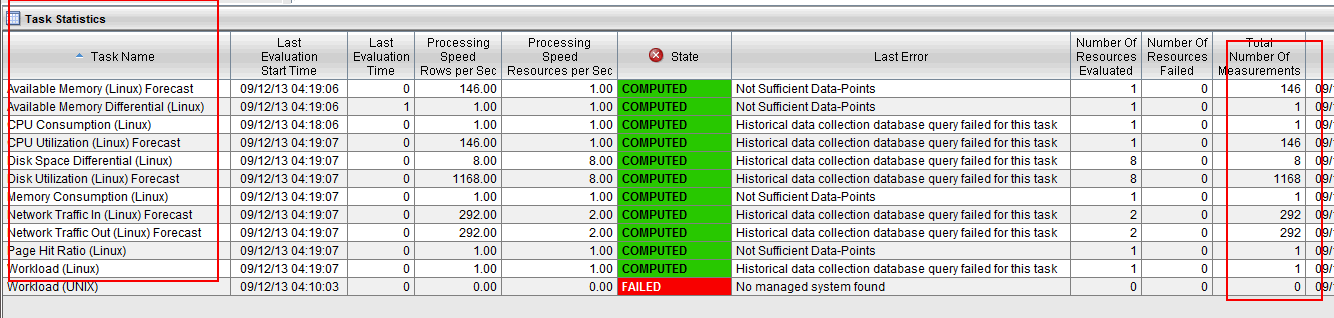
I have added a task - ( pre-deletion )

Now - delete and see that the tasks are all gone - the default tasks are cleaned out
CleanInitB Option
cleanInitDB
This will zap the ITPA tasks - there will be no tasks in the PA configurartion window.
( All the "+" will be gone )
/opt/IBM/ITM/JRE/li6263/bin/java -cp paconf.jar:/opt/IBM/ITM/classes/kjrall.jar:/opt/ibm/db2/V9.7/java/db2jcc.jar:/opt/ibm/db2/V9.7/java/db2jcc_license_cu.jar com.ibm.tivoli.pa.config.PAConfigMain -cleanInitDB
Sep 12, 2013 4:33:48 AM com.ibm.tivoli.pa.config.data.DBTaskStorage dropAllTables
INFO: Dropping all tables
Sep 12, 2013 4:33:50 AM com.ibm.tivoli.pa.config.data.DBTaskStorage dropAllTables
INFO: All tables dropped
Sep 12, 2013 4:33:50 AM com.ibm.tivoli.pa.config.data.DBTaskStorage createTables
INFO: Creating KPA Tables for the 1st time
Sep 12, 2013 4:33:51 AM com.ibm.tivoli.pa.config.data.DBTaskStorage createTables
INFO: Tables successfully created
Sep 12, 2013 4:33:51 AM com.ibm.tivoli.pa.config.PAConfigMain process
INFO: Done
This picture below says that the browser cache is still having data .
I want to see that the PA analytical tables are all empty -

IMPORTANT : Close the browser and then restart the browser again.
The below model -shows that the Browser cache was not cleaned ! so refresh cache of the browser.

execSQL kpa_tasks.sql // see results from output below
( Look below for another similar command )
/opt/IBM/ITM/JRE/li6263/bin/java -cp paconf.jar:/opt/IBM/ITM/classes/kjrall.jar:/opt/ibm/db2/V9.7/java/db2jcc.jar:/opt/ibm/db2/V9.7/java/db2jcc_license_cu.jar com.ibm.tivoli.pa.config.PAConfigMain -execSQL kpa_tasks.sql
or you can use just "/opt/IBM/ITM/lx8266/pa/config/deployed/kp0_tasks.sql'
Sep 12, 2013 4:41:49 AM com.ibm.tivoli.pa.config.data.FileTaskStorage execSQLFromFile
INFO: Executing SQL statements from: /opt/IBM/ITM/li6263/pa/bin/kpa_tasks.sql
Sep 12, 2013 4:42:00 AM com.ibm.tivoli.pa.config.PAConfigMain process
INFO: Done
Bring up the PA configuration panel and check for tasks ? that were exported.
The tasks are back.

/opt/IBM/ITM/JRE/li6263/bin/java -cp paconf.jar:/opt/IBM/ITM/classes/kjrall.jar:/opt/ibm/db2/V9.7/java/db2jcc.jar:/opt/ibm/db2/V9.7/java/db2jcc_license_cu.jar com.ibm.tivoli.pa.config.PAConfigMain -execSQL /opt/IBM/ITM/lx8266/pa/config/deployed/kp0_tasks.sql
/opt/IBM/ITM/JRE/li6263/bin/java -cp paconf.jar:/opt/IBM/ITM/classes/kjrall.jar:/opt/ibm/db2/V9.7/java/db2jcc.jar:/opt/ibm/db2/V9.7/java/db2jcc_license_cu.jar com.ibm.tivoli.pa.config.PAConfigMain -execSQL /opt/IBM/ITM/lx8266/pa/config/deployed/kpu_tasks.sql
/opt/IBM/ITM/JRE/li6263/bin/java -cp paconf.jar:/opt/IBM/ITM/classes/kjrall.jar:/opt/ibm/db2/V9.7/java/db2jcc.jar:/opt/ibm/db2/V9.7/java/db2jcc_license_cu.jar com.ibm.tivoli.pa.config.PAConfigMain -execSQL /opt/IBM/ITM/lx8266/pa/config/deployed/kp3_tasks.sql
/opt/IBM/ITM/JRE/li6263/bin/java -cp paconf.jar:/opt/IBM/ITM/classes/kjrall.jar:/opt/ibm/db2/V9.7/java/db2jcc.jar:/opt/ibm/db2/V9.7/java/db2jcc_license_cu.jar com.ibm.tivoli.pa.config.PAConfigMain -execSQL /opt/IBM/ITM/lx8266/pa/config/deployed/kp6_tasks.sql
/opt/IBM/ITM/JRE/li6263/bin/java -cp paconf.jar:/opt/IBM/ITM/classes/kjrall.jar:/opt/ibm/db2/V9.7/java/db2jcc.jar:/opt/ibm/db2/V9.7/java/db2jcc_license_cu.jar com.ibm.tivoli.pa.config.PAConfigMain -execSQL /opt/IBM/ITM/lx8266/pa/config/deployed/kpi_tasks.sql
/opt/IBM/ITM/JRE/li6263/bin/java -cp paconf.jar:/opt/IBM/ITM/classes/kjrall.jar:/opt/ibm/db2/V9.7/java/db2jcc.jar:/opt/ibm/db2/V9.7/java/db2jcc_license_cu.jar com.ibm.tivoli.pa.config.PAConfigMain -execSQL /opt/IBM/ITM/lx8266/pa/config/deployed/kp4_tasks.sql
destroyDB -
To be used - when we are typically uninstalling the PA component. - It iwll drop all TEPS DB related to ITPA.
How to recreate the ITPA tables back ?
Stop all processes. ( hd,sy , pa, cq, TEMS )
Run the paconf.jar command with the destroyDB option.
Stop Database db2stop
Start Database db2start.
Re-install the ITPA and configure the TEPS. ( itmcmd config -A cq ) Use the MTEMS instead.
This should bring back the original ITPA tasks.
Other flags supported by the tool are :
createDB - will create the databases - but with no content ( there is a small bug that needs to be fixed )
updateTables ( no args at the end ) - needs to be investigated.
Other options for the same command are :
java -jar paconf.jar [-export {taskfile} [-domain domainCode] |-createDB|-destroyDB|-cleanInitDB|-gui|-bareExecSQL|-execSQL taskfile-updateTables]
-export Export tasks to a file. Default to: kpa_tasks.sql. Optional -domain parameter specifies which domain tasks shoud be exported. Use 000 to export tasks not assigned to any domain.
-createDB Create the PA DB if it is not there
-destroyDB Drop all tables in TEPS DB created by ITPA
-cleanInitDB Re-create the PA DB. Same as -destroyDB then -createDB
-gui Bring up the bare bone GUI (not fully functional
-bareExecSQL Executing SQL statements from specified file. Tasks active/inactive state will not be preserved.
-execSQL Executing SQL statements from specified file. Tasks active/inactive state will be preserved.
-updateTables Update tables to the latest version (create nonexisting ones)
I will describe the other options in my later blog.
Wednesday, September 11, 2013
Sample DB2 commands.
A sample statement to dump all the data from a particular table to an external file
export to outfile.txt of del select * from itmuser."Linux_CPU_Averages_H"
--
Likewise one can import it back into the tables
import from outfile.txt of del insert into itmuser."Linux_CPU_Averages_H"
--
Getting a count of records in a table.
select count(*) from itmuser."Linux_CPU_Averages_H"
export to outfile.txt of del select * from itmuser."Linux_CPU_Averages_H"
--
Likewise one can import it back into the tables
import from outfile.txt of del insert into itmuser."Linux_CPU_Averages_H"
--
Getting a count of records in a table.
select count(*) from itmuser."Linux_CPU_Averages_H"
Friday, September 6, 2013
KFWITM217E - cannot load product configuration data.
This can happen if the Historical collections panel is open on the TEP GUI and the database is shut down in the back end ( accidentally )
To resolve - check if the DB2 is running and then restart it. Close the Historical collection and reopen it.

When you move the control over one of the attribute groups in the historical collection Configuration window - and the database ( in this case DB2 ) got shutdown.

To resolve - check if the DB2 is running and then restart it. Close the Historical collection and reopen it.

When you move the control over one of the attribute groups in the historical collection Configuration window - and the database ( in this case DB2 ) got shutdown.

KFWITM197E - User has no assigned navigator views.
This popup on TEP GUI can show up when user tries to login and has earlier messed up the sysadmin privileges ( like changing administrator modes and author modes etc etc )
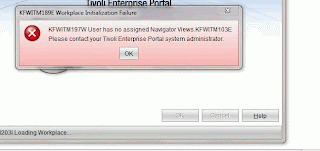
To resolve this.
1. Rebuild the TEPS.
2. Restart the TEPS.
If this does not work... try this
1. Stop TEPS
2. drop database TEPS
3. db2stop ( force if required )
4. db2start
list active databases - to check that only WAREHOUS is there.
5. Reconfigure TEPS
6. Start TEPS
( just to start afresh -I stopped TEMS, HD, SY, WPA and SPA as well )
This did it.

To resolve this.
1. Rebuild the TEPS.
2. Restart the TEPS.
If this does not work... try this
1. Stop TEPS
2. drop database TEPS
3. db2stop ( force if required )
4. db2start
list active databases - to check that only WAREHOUS is there.
5. Reconfigure TEPS
6. Start TEPS
( just to start afresh -I stopped TEMS, HD, SY, WPA and SPA as well )
This did it.
Tuesday, September 3, 2013
kpacma.log missing in 6.2.3.FP1
This is the log file for the Performance Analyzer. Gets created in the <ITMHOME>/logs folder - Gives a run of the agent.
Check if the Performance Analyzer is configured and it is successful. Go to MTEMS and start the agent.
Note the missing values for configuring the PA in the User Interface - this is the cause of the missing kpacma.log file.

cd ITMHOME/logs
ls -l kpacma.log - is missing.
Now,configure it

Restart the agent after the configuration, and the kpacma..log will be created
Check if the Performance Analyzer is configured and it is successful. Go to MTEMS and start the agent.
Note the missing values for configuring the PA in the User Interface - this is the cause of the missing kpacma.log file.

cd ITMHOME/logs
ls -l kpacma.log - is missing.
Now,configure it

Restart the agent after the configuration, and the kpacma..log will be created
Monday, September 2, 2013
Unable to launch TEP Portal Client ( Launching the Client in VNC works but does not work on Windows platform. )
Sometimes if you get this message. as shown below.
"Unable to open the application"
Identify where you got this problem. In my case the problem was on my laptop, but If I launch the VNC - the TEP JWS was able to launch !
So the change has to be on the windows laptop - drivers/etc/hosts file.
Changes made were
1: Clear the Java cache

2. Update the /etc/hosts drivers file as shown.
9.118.41.57 nc9118041057.in.ibm.com nc9118041057
"Found unsigned entry in resource."

"Unable to open the application"
Identify where you got this problem. In my case the problem was on my laptop, but If I launch the VNC - the TEP JWS was able to launch !
So the change has to be on the windows laptop - drivers/etc/hosts file.
Changes made were
1: Clear the Java cache

2. Update the /etc/hosts drivers file as shown.
9.118.41.57 nc9118041057.in.ibm.com nc9118041057
"Found unsigned entry in resource."

Subscribe to:
Posts (Atom)