Tuesday, August 20, 2013

ITPA Reporting Problem Checklist.

Check List on reporting problems in ITPA.

On what platform is ITPA installed on ? Please specify the version as well.
AIX ( e.g: 6.1) ,  RHEL 5.5 -5.6,  Windows 2012,  etc

Is this 32 or 64 bit. 


Is the platform configuration supported as listed in this URL ? ( Check for appropriate ITM version )
http://pic.dhe.ibm.com/infocenter/tivihelp/v15r1/index.jsp?topic=%2Fcom.ibm.itm.doc_6.2.3%2Fitm623_install243.htm&path=3_1_2_0_6_0_6_0

What Database is the ITPA connecting to
a ) If DB2  - which version - V9.5 , V9.7, V 10.1 _______

b ) Oracle   ___________________________________
c) MYSQL  ___________________________________

Was this an upgrade from an earlier ITM/ITPA  to newer ITM/ITPA.
e.g:  Was an earlier 6.2.3 FP1 running and now upgraded to ( .e.g: 6.3.0)
New /Upgrade - If Upgrade - State the Old and the New versions of ITM.


_________________________________________________________

Was the ITPA problem you are reporting noticed after the upgrade ? ( or was it an existing one and reporting it now )

Was the installation of ITM using manual step by step  or silent install ?

ITM step by step: 
 install.sh 

ITM Silent install
install.sh  -h <> -p <silent_install.sh >  


Was the ITPA installed manually step by step or silent install.sh

./install.sh  -h <ITMHOME>  -p  samples/silent_install_tems.txt
./install.sh  -h <ITMHOME> -p samples/silent_install_tepa.txt  
..silent_install_domains.txt  ..silent_install_tems.txt  
..silent_install_tepa.txt  
..silent_install_teps.txt  
..silent_install_tepw.txt  
__

Was ITPA configured using MTEMS ( Manage Tivoli Enterprise Monitoring Server )
Yes/No

____________________


Was the 'Test Connection' successful when configuring the ITPA.

Yes/No


If no, Then this has to be fixed first, before ITPA can communicate.
Find the right JDBC driver and check that the DB itmuser schema is right ?
I need a snapshot at this time of the failure ?


  If ITPA is installed on this server,  

Run the cinfo -t // check that the PA is in Product Desc

*********** Tue Aug 20 04:19:44 EDT 2013 ******************
User: root Groups: root bin daemon sys adm disk wheel
Host name : nc9118041057         Installer Lvl:06.30.02.00
CandleHome: /opt/IBM/ITM
Version Format: VV.RM.FF.II (V: Version; R: Release; M: Modification; F: Fix; I: Interim Fix)
***********************************************************
...Product inventory

PC   PRODUCT DESC                                              PLAT    VER           BUILD           INSTALL DATE

as   Tivoli Enterprise Monitoring Automation Server            li6263  06.30.02.00   d3190a          20130715 0052
ax   IBM Tivoli Monitoring Shared Libraries                    li6263  06.30.02.00   d3190a          20130715 0051
cj   Tivoli Enterprise Portal Desktop Client                   li6263  06.30.02.00   d3190a          20130715 0113
cq   Tivoli Enterprise Portal Server                           li6263  06.30.02.00   d3190a          20130715 0115
cw   Tivoli Enterprise Portal Browser Client                   li6263  06.30.02.00   d3190a          20130715 0114
gs   IBM GSKit Security Interface                              li6243  08.00.50.05   d3189a          -
hd   Warehouse Proxy                                           li6263  06.30.02.00   d3190a          20130715 0122
iu   IBM HTTP Server                                           li6263  08.00.00.01   d3189a          20130715 0114
iw   IBM Tivoli Enterprise Portal Server Extensions            li6263  08.00.06.00   d3189a          20130715 0114
jr   Tivoli Enterprise-supplied JRE                            li6263  07.04.02.00   201305211258    -
kf   IBM Eclipse Help Server                                   li6263  06.30.02.00   d3189a          20130715 0115
lz   Monitoring Agent for Linux OS                             li6263  06.30.02.00   31911           20130715 0250
ms   Tivoli Enterprise Monitoring Server                       li6263  06.30.02.00   d3190a          20130715 0052
pa   Tivoli Performance Analyzer                               li6263  06.30.02.00   31891           20130715 0122              <=============
sh   Tivoli Enterprise Monitoring SOAP Server                  li6263  06.30.02.00   d3190a          20130715 0052
sy   Summarization and Pruning Agent                           li6263  06.30.02.00   d3191a          20130715 0051
t1   File Transfer Enablement                                  li6263  07.30.00.00   20100000-0000   -
ue   Tivoli Enterprise Services User Interface Extensions      li6263  06.30.02.00   d3190a          20130715 0052
ui   Tivoli Enterprise Services User Interface                 li6263  06.30.02.00   d3190a          20130715 0051


Application support  related files : Does the cinfo - report the supported domain application support.

cinfo -t // check that the Agent application support definitions are installed. ( I have only listed the Linux OS Agent domain support here )


PC   APPLICATION SUPPORT DESC                                  PLAT    APP VER       BUILD           INSTALL DATE

p3   Performance Analyzer Domain for OS agent                  tms     06.30.02.00   31892           20130730 0756
p3   Performance Analyzer Domain for OS agent                  tpa     06.30.02.00   31892           20130730 0755
p3   Performance Analyzer Domain for OS agent                  tpd     06.30.02.00   31892           20130730 0755
p3   Performance Analyzer Domain for OS agent                  tps     06.30.02.00   31892           20130730 0755
p3   Performance Analyzer Domain for OS agent                  tpw     06.30.02.00   31892           20130730 0754


Open the TEPS Java Web Start GUI: 
( Here are multiple ways, one is the Web Client , and other is the WebStart Client ) 
The Web Client is the browser based and the WebStart Client /aka thick client - is a java applet, and uses javaws - launch from ITMHOME/Java/JRE/bin )  


Launch either of the TEP GUI and click on the PA configuration button on the task bar.


Does it launch and get the DB Connection failure error ? or launch with all the domains tasks showing up.


If the DB connection failure message popup comes up,

Login to DB2 and check if the ITPA tables are installed ?
su - db2inst1
connect to warehous
list tables for all 

db2 -f  <file_with_above_2lines>

at the top of the list  you will see these tables created.
KPAATTR                         ITMUSER         T     2013-08-14-04.11.22.449223
KPACONF                         ITMUSER         T     2013-08-14-04.11.24.016938
KPACONSTRAINTS                  ITMUSER         T     2013-08-14-04.11.22.790563
KPADOMAINS                      ITMUSER         T     2013-08-14-04.11.23.864283
KPAEXCCONSTR                    ITMUSER         T     2013-08-14-04.11.23.782160
KPAEXCEPTIONS                   ITMUSER         T     2013-08-14-04.11.23.705660
KPAFOLDERS                      ITMUSER         T     2013-08-14-04.11.23.611851
KPAIDENTDESTS                   ITMUSER         T     2013-08-14-04.11.22.885313
KPAIDENTSRCS                    ITMUSER         T     2013-08-14-04.11.22.974005
KPAJOINS                        ITMUSER         T     2013-08-14-04.11.23.074940
KPALOCK                         ITMUSER         T     2013-08-14-04.11.23.244406
KPANODES                        ITMUSER         T     2013-08-14-04.11.22.592611
KPAOUTPUTS                      ITMUSER         T     2013-08-14-04.11.22.699775
KPAOUTPUTSETS                   ITMUSER         T     2013-08-14-04.11.23.163996
KPAPROPS                        ITMUSER         T     2013-08-14-04.11.22.149638
KPASPSSTASKS                    ITMUSER         T     2013-08-14-04.11.23.517487
KPATASKS                        ITMUSER         T     2013-08-14-04.11.21.940059
KPATFRAMES                      ITMUSER         T     2013-08-14-04.11.23.343293


If this is not installed then the "DB connection failure" popup occurs.
To resolve this - the Base ITM PA component may not have been installed.
Reinstall the Base ITM and choose the PA component, after installation check that the PA tables are present. ( this is one of the symptoms )
If the tables are present, proceed to look for other symptoms.
( I need the  cinfo -t results redirected to a file and sent across )


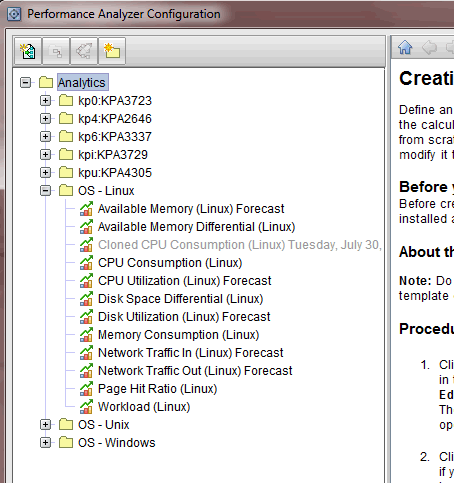
If window opens successfully, then give me a snapshot of the default analytical tasks ( in this example it is Linux )
Below I have installed the  Linux OS Agent - hence they are non-grayed, ( otherwise they would have been grayed out - indicating that you would install the Agent component ) 


If it is UNIX ,then these are the default tasks - are they there ?


If Windows - the default tasks are : ( Here the tasks are greyed out since I have not installed the Windows OS Domain -If you are looking at Windows OS - then install the Agent, Install the PA Agent again??  and Reconfigure the TEPS "itmcmd config -A cq ")  


Is the problem with Historical Collections ?
If no - skip this steps below.

What is the Task Run Interval ?


Above I have set it to 2 minutes once.


e.g: For Available Memory task to run successfully,  then Linux VM Stats have to be configured. 

Test by playing with changing the granularity of  Hourly to see some graphs/charts.


ITPA Logging File configurations :


<ITMHOME>/li6263/pa/config
 init.cfg

AgentIdUniqueId__file=local.cfg
ConsolePassword__file=local.cfg
DisableVACM=true
EngineBoots__file=local.cfg
LogCount=3
LogFile=/opt/IBM/ITM/logs/kpacma.log
LogLevel=Debug  <== Can be Info or Debug
LogSize=10000000
NotificationQueueLimit=50
UdpPort=-1


<ITMHOME>/li6263/pa/config/agent.cfg

#
# HARMONi Suite 2.1 configuration file
#
set verbose off

#
# Default Communities
#
community add default public RC
community add default private RC

#
# Subagent Section
#
subagent load analytic
subagent load fastira
subagent load fastarithmetic
subagent load fastlineartrend
subagent load spsstrend
subagent load tasksimp

analytic NLT_DELETE_TEMP_FILES=true
# TDW Database Connection
TDW_DB_TYPE=DB2
analytic TDW_DB_TYPE=DB2
analytic TDW_DB_CONN_TYPE=JDBC
analytic TDW_DB_DRIVER=com.ibm.db2.jcc.DB2Driver
analytic TDW_DB_DSN="jdbc:db2://9.118.41.57:50000/WAREHOUS"
analytic TDW_DB_USER=itmuser
analytic TDW_DB_PASSWD={AES256:keyfile:a}j7tKGILZ8xw3myYH3g6sXg==
analytic TDW_DB_SCHEMA=itmuser
analytic SPSS.Home=/opt/IBM/SPSS/StatisticsServer20
analytic SPSS.Enabled=false
analytic TEP_TMSC=ip.pipe:#9.118.41.57
analytic start


ITPA log files.

<ITMHOME>/logs/kpacma.log

Monday, August 19, 2013

Performance Analyzer tasks are configured but yet no tasks appear in the TEP GUI Panel.


Let's say you have installed the Performance Analyzer and configured and somehow no matter what - the default analytical tasks don't show up in the TEPS GUI.

The tasks panel is EMPTY !


In other words, this is the scenario.

You have installed the PA, and is connecting to the Database on a server and is successful.

But it could be that the Hostname of the Database it is connecting to  - is different,

This could lead to the analytical tasks not showing up in the TEPS GUI panel.


After configuring it correctly to the right Database where the PA component ( ITM PA ) is installed then the tasks will show up as shown below.


Failed - Configuration not complete ( PA error message) WAITING status

This message can happen if the PA was not configured and started without doing so first.

Here I will describe how to resolve such an error.


Launch the MTEMS ( Manage TEMS ) console and right click on the PA agent.

Stop the PA agent first.
Configure and go thru setting the correct attributes for the Database connection,
Start the PA agent again.

Notice below that the Database Username and the password is not set for the Database.

This has to be done first.


Once the configuration is complete, the PA TEPS status changes to  WAITING.

You chose not to initialize PA tables, however these tables do not exist ( Performance Analyzer )

Here I will try to describe the scenario where this error message can appear when trying to configure the Tivoli Performance Analyzer.


Let's say you are trying to configure the PA through the MTEMS console, and you get this message.


This is because the database that this PA is talking to - does not have the PA tables installed.

The server where the Database is located does not have the PA tables installed.

Here below, the PA is being configured on 9.118.41.57, but however it is being pointed to a different server 9.48.184.132 where the PA tables are ASSUMED to be installed.


If the 9.48.184.132 - does not have the ITPA installed - it could result in the above error.


To resolve:
Check that the ITM - Performance Analyzer base component is installed on the 9.48.184.132 server first.

This should fix the problem.

Note : At this time the 'Test Connection' will work  - because it is only checking the connection to the Database, and not the ITPA tables.

Wednesday, August 14, 2013

Tracing Performance Analyzer Agent activity in Java.

In most instances the end user would like to know what is happening in the Java applet when they click on the Performance Analyzer Configuration Java Applet on the TEPS GUI.


e.g: User would click on the PA configuration button and would like to see the Java activity logs.


(Internal note : The instructions are in TTEC go 623FP1 document ) Here I will describe ways to see what is happening when the Java Web Start TEPS GUI is started.

Open the logging.properties file in the ITMHOME/JRE/<arch>/lib/ folder.

e.g:.<ITMHOME>/JRE/li6263/lib/logging.properties, in case of RHEL 


#handlers= java.util.logging.ConsoleHandler

# To also add the FileHandler, use the following line instead.
handlers= java.util.logging.FileHandler, java.util.logging.ConsoleHandler

java.util.logging.FileHandler.limit = 5000000
java.util.logging.FileHandler.count = 1

com.ibm.tivoi.pa.config.level=FINEST


After making changes to the file.  Stop the TEPS GUI, and restart it on the server - in my case I have it on the RHEL.

Now, if I click on the PA config button - A file called java0.log gets created in the home directory.
This clearly helps in debugging issues on the Performance Analyzer component. 
If the file does not get created - retry,  ( I had to stop the TEMS as well - just once to get the file )
  In my case it is /root folder.


You will see the corresponding error message in the java0.log file.

    <date>2013-08-14T03:13:10</date>
    <millis>1376467990682</millis>
    <sequence>13</sequence>
    <logger>com.ibm.tivoli.pa.config.data.DBFolderStorage</logger>
    <level>WARNING</level>
    <class>com.ibm.tivoli.pa.config.data.DBFolderStorage</class>
    <method>loadFolders</method>
    <thread>0</thread>
    <message>KFWITM217E Request error: [IBM][CLI Driver][DB2/LINUX] SQL0204N  "ITMUSER.KPAFOLDERS" is an undefined name.  SQLSTATE=42704, GENERIC SQLSTATE: 42S02, ERR: -204
SQLExecDirect rc=-1: SQL_ERROR
</message>
</record>
<record>
    <date>2013-08-14T03:13:10</date>
    <millis>1376467990950</millis>
    <sequence>14</sequence>
    <logger>com.ibm.tivoli.pa.config.data.DBTaskStorage</logger>
    <level>WARNING</level>
    <class>com.ibm.tivoli.pa.config.data.DBTaskStorage</class>
    <method>readKPAConf</method>
    <thread>3</thread>
    <message>java.sql.SQLException: KFWITM217E Request error: [IBM][CLI Driver][DB2/LINUX] SQL0204N  "ITMUSER.KPACONF" is an undefined name.  SQLSTATE=42704, GENERIC SQLSTATE: 42S02, ERR: -204
SQLExecDirect rc=-1: SQL_ERROR
</message>
</record>
<record>
    <date>2013-08-14T03:13:11</date>
    <millis>1376467991001</millis>
    <sequence>15</sequence>
    <logger>com.ibm.tivoli.pa.config.data.DBTaskStorage</logger>
    <level>SEVERE</level>
    <class>com.ibm.tivoli.pa.config.data.DBTaskStorage</class>
    <method>isDBValid</method>
    <thread>3</thread>
    <message>DB Connection is not valid java.sql.SQLException: KFWITM217E Request error: [IBM][CLI Driver][DB2/LINUX] SQL0204N  "ITMUSER.KPATASKS" is an undefined name.  SQLSTATE=42704, GENERIC SQLSTATE: 42S02, ERR: -204
SQLExecDirect rc=-1: SQL_ERROR
</message>
</record>
<record>
    <date>2013-08-14T03:13:11</date>
    <millis>1376467991020</millis>
    <sequence>16</sequence>
    <logger>com.ibm.tivoli.pa.config.data.DBTaskStorage</logger>
    <level>WARNING</level>

--

A sample java.log from one of the windows 2012 server is shown below

<?xml version="1.0" encoding="windows-1252" standalone="no"?>
<!DOCTYPE log SYSTEM "logger.dtd">
<log>
<record>
  <date>2013-11-29T13:43:44</date>
  <millis>1385761424267</millis>
  <sequence>0</sequence>  <logger>com.ibm.tivoli.pa.config.Helper</logger>
  <level>FINE</level>
  <class>com.ibm.tivoli.pa.config.Helper</class>
  <method>getTextResource</method>
  <thread>30</thread>
  <message>Resource bundle created with default locale. Country:  Language:  Variant: </message>
</record>
<record>
  <date>2013-11-29T13:43:54</date>
  <millis>1385761434470</millis>
  <sequence>1</sequence>
  <logger>com.ibm.tivoli.pa.config.data.definitions.XmlModuleLoader</logger>
  <level>FINER</level>
  <class>com.ibm.tivoli.pa.config.data.definitions.XmlModuleLoader</class>
  <method>loadModuleDefinitions</method>
  <thread>20</thread>
  <message>Loading module definitions, search class paths...</message>
</record>
<record>
  <date>2013-11-29T13:43:54</date>
  <millis>1385761434470</millis>
  <sequence>2</sequence>
  <logger>com.ibm.tivoli.pa.config.data.definitions.XmlModuleLoader</logger>
  <level>FINER</level>
  <class>com.ibm.tivoli.pa.config.data.definitions.XmlModuleLoader</class>
  <method>loadModuleDefinitions</method>
  <thread>20</thread>
  <message>Potential module def directory: jar:file:/C:/IBM/ITM/CNP/paconf.jar!/mdfs</message>
</record>
<record>
  <date>2013-11-29T13:43:54</date>
  <millis>1385761434486</millis>
  <sequence>3</sequence>
  <logger>com.ibm.tivoli.pa.config.data.definitions.XmlModuleLoader</logger>
  <level>FINER</level>
  <class>com.ibm.tivoli.pa.config.data.definitions.XmlModuleLoader</class>
  <method>loadModuleDefinition</method>
  <thread>20</thread>
  <message>Loading module definition</message>
</record>
<record>
  <date>2013-11-29T13:43:54</date>
  <millis>1385761434486</millis>
  <sequence>4</sequence>
  <logger>com.ibm.tivoli.pa.config.data.definitions.XmlModuleLoader</logger>
  <level>FINER</level>
  <class>com.ibm.tivoli.pa.config.data.definitions.XmlModuleLoader</class>
  <method>loadModuleDefinition</method>
  <thread>20</thread>
  <message>System vendor IBM Corporation</message>
</record>
<record>
  <date>2013-11-29T13:43:54</date>
  <millis>1385761434502</millis>
  <sequence>5</sequence>
  <logger>com.ibm.tivoli.pa.config.data.definitions.XmlModuleLoader</logger>
  <level>FINER</level>
  <class>com.ibm.tivoli.pa.config.data.definitions.XmlModuleLoader</class>
  <method>loadModuleDefinition</method>
  <thread>20</thread>
  <message>Original XML factory null</message>
</record>
<record>
  <date>2013-11-29T13:43:54</date>
  <millis>1385761434502</millis>
  <sequence>6</sequence>
  <logger>com.ibm.tivoli.pa.config.data.definitions.XmlModuleLoader</logger>
  <level>FINER</level>
  <class>com.ibm.tivoli.pa.config.data.definitions.XmlModuleLoader</class>
  <method>loadModuleDefinition</method>
  <thread>20</thread>
  <message>javax.xml.parsers.DocumentBuilderFactory set to org.apache.xerces.jaxp.DocumentBuilderFactoryImpl</message>
</record>
<record>
  <date>2013-11-29T13:43:54</date>
  <millis>1385761434564</millis>
  <sequence>7</sequence>
  <logger>com.ibm.tivoli.pa.config.data.definitions.XmlModuleLoader</logger>
  <level>FINE</level>
  <class>com.ibm.tivoli.pa.config.data.definitions.XmlModuleLoader</class>
  <method>getResourceBundle</method>
  <thread>20</thread>
  <message>Backup resource name used: Arithmetic</message>
</record>
<record>
  <date>2013-11-29T13:43:54</date>
  <millis>1385761434564</millis>
  <sequence>8</sequence>
  <logger>com.ibm.tivoli.pa.config.data.definitions.XmlModuleLoader</logger>
  <level>FINE</level>
  <class>com.ibm.tivoli.pa.config.data.definitions.XmlModuleLoader</class>
  <method>getResourceBundle</method>
  <thread>20</thread>
  <message>Top level not found, try the path from JAR</message>
</record>
<record>
  <date>2013-11-29T13:43:54</date>
  <millis>1385761434580</millis>
  <sequence>9</sequence>
  <logger>com.ibm.tivoli.pa.config.data.definitions.XmlModuleLoader</logger>
  <level>FINER</level>
  <class>com.ibm.tivoli.pa.config.data.definitions.XmlModuleLoader</class>
  <method>loadModuleDefinition</method>
  <thread>20</thread>
  <message>Loading module definition</message>
</record>
<record>
  <date>2013-11-29T13:43:54</date>
  <millis>1385761434580</millis>
  <sequence>10</sequence>
  <logger>com.ibm.tivoli.pa.config.data.definitions.XmlModuleLoader</logger>
  <level>FINER</level>
  <class>com.ibm.tivoli.pa.config.data.definitions.XmlModuleLoader</class>
  <method>loadModuleDefinition</method>
  <thread>20</thread>
  <message>System vendor IBM Corporation</message>
</record>
<record>
  <date>2013-11-29T13:43:54</date>
  <millis>1385761434580</millis>
  <sequence>11</sequence>
  <logger>com.ibm.tivoli.pa.config.data.definitions.XmlModuleLoader</logger>
  <level>FINER</level>
  <class>com.ibm.tivoli.pa.config.data.definitions.XmlModuleLoader</class>
  <method>loadModuleDefinition</method>
  <thread>20</thread>
  <message>Original XML factory org.apache.xerces.jaxp.DocumentBuilderFactoryImpl</message>
</record>
<record>
  <date>2013-11-29T13:43:54</date>
  <millis>1385761434580</millis>
  <sequence>12</sequence>
  <logger>com.ibm.tivoli.pa.config.data.definitions.XmlModuleLoader</logger>
  <level>FINER</level>
  <class>com.ibm.tivoli.pa.config.data.definitions.XmlModuleLoader</class>
  <method>loadModuleDefinition</method>
  <thread>20</thread>
  <message>javax.xml.parsers.DocumentBuilderFactory set to org.apache.xerces.jaxp.DocumentBuilderFactoryImpl</message>
</record>
<record>
  <date>2013-11-29T13:43:54</date>
  <millis>1385761434595</millis>
  <sequence>13</sequence>
  <logger>com.ibm.tivoli.pa.config.data.definitions.XmlModuleLoader</logger>
  <level>FINER</level>
  <class>com.ibm.tivoli.pa.config.data.definitions.XmlModuleLoader</class>
  <method>loadModuleDefinition</method>
  <thread>20</thread>
  <message>Loading module definition</message>
</record>
<record>
  <date>2013-11-29T13:43:54</date>
  <millis>1385761434595</millis>
  <sequence>14</sequence>
  <logger>com.ibm.tivoli.pa.config.data.definitions.XmlModuleLoader</logger>
  <level>FINER</level>
  <class>com.ibm.tivoli.pa.config.data.definitions.XmlModuleLoader</class>
  <method>loadModuleDefinition</method>
  <thread>20</thread>
  <message>System vendor IBM Corporation</message>
</record>
<record>
  <date>2013-11-29T13:43:54</date>
  <millis>1385761434595</millis>
  <sequence>15</sequence>
  <logger>com.ibm.tivoli.pa.config.data.definitions.XmlModuleLoader</logger>
  <level>FINER</level>
  <class>com.ibm.tivoli.pa.config.data.definitions.XmlModuleLoader</class>
  <method>loadModuleDefinition</method>
  <thread>20</thread>
  <message>Original XML factory org.apache.xerces.jaxp.DocumentBuilderFactoryImpl</message>
</record>
<record>
  <date>2013-11-29T13:43:54</date>
  <millis>1385761434595</millis>
  <sequence>16</sequence>
  <logger>com.ibm.tivoli.pa.config.data.definitions.XmlModuleLoader</logger>
  <level>FINER</level>
  <class>com.ibm.tivoli.pa.config.data.definitions.XmlModuleLoader</class>
  <method>loadModuleDefinition</method>
  <thread>20</thread>
  <message>javax.xml.parsers.DocumentBuilderFactory set to org.apache.xerces.jaxp.DocumentBuilderFactoryImpl</message>
</record>
<record>
  <date>2013-11-29T13:43:54</date>
  <millis>1385761434627</millis>
  <sequence>17</sequence>
  <logger>com.ibm.tivoli.pa.config.data.definitions.XmlModuleLoader</logger>
  <level>FINER</level>
  <class>com.ibm.tivoli.pa.config.data.definitions.XmlModuleLoader</class>
  <method>loadModuleDefinitions</method>
  <thread>20</thread>
  <message>Number of modules detected: 3</message>
</record>
<record>
  <date>2013-11-29T13:43:54</date>
  <millis>1385761434627</millis>
  <sequence>18</sequence>
  <logger>com.ibm.tivoli.pa.config.controller.ErrorController</logger>
  <level>FINER</level>
  <class>com.ibm.tivoli.pa.config.controller.ErrorController</class>
  <method>setMainDialog</method>
  <thread>20</thread>
  <message>Main dialog set to: com.ibm.tivoli.pa.config.MainDialog[dialog0,0,0,0x0,invalid,hidden,layout=java.awt.BorderLayout,MODELESS,title=Performance Analyzer Configuration,defaultCloseOperation=HIDE_ON_CLOSE,rootPane=javax.swing.JRootPane[,0,0,0x0,invalid,layout=javax.swing.JRootPane$RootLayout,alignmentX=0.0,alignmentY=0.0,border=,flags=16777673,maximumSize=,minimumSize=,preferredSize=],rootPaneCheckingEnabled=true]</message>
</record>
<record>
  <date>2013-11-29T13:43:54</date>
  <millis>1385761434720</millis>
  <sequence>19</sequence>
  <logger>com.ibm.tivoli.pa.config.data.DBFolderStorage</logger>
  <level>WARNING</level>
  <class>com.ibm.tivoli.pa.config.data.DBFolderStorage</class>
  <method>loadFolders</method>
  <thread>20</thread>
  <message>KFWITM220E Request failed during execution.</message>
</record>
<record>
  <date>2013-11-29T13:43:54</date>
  <millis>1385761434783</millis>
  <sequence>20</sequence>
  <logger>com.ibm.tivoli.pa.config.data.DBDomainsStorage</logger>
  <level>WARNING</level>
  <class>com.ibm.tivoli.pa.config.data.DBDomainsStorage</class>
  <method>loadDomains</method>
  <thread>20</thread>
  <message>KFWITM220E Request failed during execution.</message>
</record>
<record>
  <date>2013-11-29T13:43:54</date>
  <millis>1385761434783</millis>
  <sequence>21</sequence>
  <logger>com.ibm.tivoli.pa.config.controller.PAConfigController</logger>
  <level>FINER</level>
  <class>com.ibm.tivoli.pa.config.controller.PAConfigController</class>
  <method>setTreeModel</method>
  <thread>20</thread>
  <message>Setting tree model to com.ibm.tivoli.pa.config.SortableTreeModel@95781692</message>
</record>
<record>
  <date>2013-11-29T13:43:54</date>
  <millis>1385761434799</millis>
  <sequence>22</sequence>
  <logger>com.ibm.tivoli.pa.config.controller.PAConfigController</logger>
  <level>FINER</level>
  <class>com.ibm.tivoli.pa.config.controller.PAConfigController</class>
  <method>setTreeModel</method>
  <thread>20</thread>
  <message>Tree model set to com.ibm.tivoli.pa.config.SortableTreeModel@95781692</message>
</record>
<record>
  <date>2013-11-29T13:43:54</date>
  <millis>1385761434814</millis>
  <sequence>23</sequence>
  <logger>com.ibm.tivoli.pa.config.AnalyticSpecPane</logger>
  <level>FINER</level>
  <class>com.ibm.tivoli.pa.config.AnalyticSpecPane</class>
  <method>setAnalyticTask</method>
  <thread>20</thread>
  <message>Showing overview pane as root selected</message>
</record>
<record>
  <date>2013-11-29T13:43:54</date>
  <millis>1385761434830</millis>
  <sequence>24</sequence>
  <logger>com.ibm.tivoli.pa.config.controller.TaskLoaderThread</logger>
  <level>FINER</level>
  <class>com.ibm.tivoli.pa.config.controller.TaskLoaderThread</class>
  <method>run</method>
  <thread>70</thread>
  <message>TaskLoaderThread started</message>
</record>
<record>
  <date>2013-11-29T13:43:54</date>
  <millis>1385761434845</millis>
  <sequence>25</sequence>
  <logger>com.ibm.tivoli.pa.config.GeneralPanel</logger>
  <level>FINER</level>
  <class>com.ibm.tivoli.pa.config.GeneralPanel</class>
  <method>&lt;init&gt;</method>
  <thread>20</thread>
  <message>Number of modules loaded: 3</message>
</record>
<record>
  <date>2013-11-29T13:43:54</date>
  <millis>1385761434939</millis>
  <sequence>26</sequence>
  <logger>com.ibm.tivoli.pa.config.ConstraintCellEditor</logger>
  <level>FINER</level>
  <class>com.ibm.tivoli.pa.config.ConstraintCellEditor</class>
  <method>&lt;init&gt;</method>
  <thread>20</thread>
  <message>ConstraintCellEditor created</message>
</record>
<record>
  <date>2013-11-29T13:43:54</date>
  <millis>1385761434955</millis>
  <sequence>27</sequence>
  <logger>com.ibm.tivoli.pa.config.InputPanel</logger>
  <level>FINE</level>
  <class>com.ibm.tivoli.pa.config.InputPanel</class>
  <method>createExpressionPane</method>
  <thread>20</thread>
  <message>Apply expression button created with mnemonic: p (Apply Expression)</message>
</record>
<record>
  <date>2013-11-29T13:43:55</date>
  <millis>1385761435174</millis>
  <sequence>28</sequence>
  <logger>com.ibm.tivoli.pa.config.ConstraintCellEditor</logger>
  <level>FINER</level>
  <class>com.ibm.tivoli.pa.config.ConstraintCellEditor</class>
  <method>&lt;init&gt;</method>
  <thread>20</thread>
  <message>ConstraintCellEditor created</message>
</record>
<record>
  <date>2013-11-29T13:43:55</date>
  <millis>1385761435252</millis>
  <sequence>29</sequence>
  <logger>com.ibm.tivoli.pa.config.controller.ModuleSelectionController</logger>
  <level>FINER</level>
  <class>com.ibm.tivoli.pa.config.controller.ModuleSelectionController</class>
  <method>actionPerformed</method>
  <thread>20</thread>
  <message>Setting doc link to : http://TIV505:15200/classes/candle/kpa/resources/help/concept/c_at_arithmetic.html</message>
</record>
<record>
  <date>2013-11-29T13:43:55</date>
  <millis>1385761435345</millis>
  <sequence>30</sequence>
  <logger>com.ibm.tivoli.pa.config.AnalyticSpecPane</logger>
  <level>FINER</level>
  <class>com.ibm.tivoli.pa.config.AnalyticSpecPane</class>
  <method>setAnalyticTask</method>
  <thread>20</thread>
  <message>Showing overview pane as root selected</message>
</record>
<record>
  <date>2013-11-29T13:43:55</date>
  <millis>1385761435408</millis>
  <sequence>31</sequence>
  <logger>com.ibm.tivoli.pa.config.data.DBTaskStorage</logger>
  <level>WARNING</level>
  <class>com.ibm.tivoli.pa.config.data.DBTaskStorage</class>
  <method>readKPAConf</method>
  <thread>70</thread>
  <message>java.sql.SQLException: KFWITM220E Request failed during execution.</message>
</record>
<record>
  <date>2013-11-29T13:43:55</date>
  <millis>1385761435424</millis>
  <sequence>32</sequence>
  <logger>com.ibm.tivoli.pa.config.controller.ModuleSelectionController</logger>
  <level>FINER</level>
  <class>com.ibm.tivoli.pa.config.controller.ModuleSelectionController</class>
  <method>actionPerformed</method>
  <thread>70</thread>
  <message>Setting doc link to : http://TIV505:15200/classes/candle/kpa/resources/help/concept/c_at_arithmetic.html</message>
</record>
<record>
  <date>2013-11-29T13:43:55</date>
  <millis>1385761435533</millis>
  <sequence>33</sequence>
  <logger>com.ibm.tivoli.pa.config.data.DBTaskStorage</logger>
  <level>SEVERE</level>
  <class>com.ibm.tivoli.pa.config.data.DBTaskStorage</class>
  <method>isDBValid</method>
  <thread>70</thread>
  <message>DB Connection is not valid java.sql.SQLException: KFWITM220E Request failed during execution.</message>
</record>
<record>
  <date>2013-11-29T13:43:55</date>
  <millis>1385761435533</millis>
  <sequence>34</sequence>
  <logger>com.ibm.tivoli.pa.config.data.DBTaskStorage</logger>
  <level>FINER</level>
  <class>com.ibm.tivoli.pa.config.data.DBTaskStorage</class>
  <method>isDBValid</method>
  <thread>70</thread>
  <message>THROW</message>
  <exception>
    <message>java.sql.SQLException: KFWITM220E Request failed during execution.</message>
    <frame>
      <class>com.ibm.tivoli.pa.config.data.reportserviceconnection.ReportServiceStatement</class>
      <method>executeQuery</method>
      <line>57</line>
    </frame>
    <frame>
      <class>com.ibm.tivoli.pa.config.data.DBTaskStorage</class>
      <method>isDBValid</method>
      <line>2848</line>
    </frame>
    <frame>
      <class>com.ibm.tivoli.pa.config.data.DBTaskStorage</class>
      <method>loadTasks</method>
      <line>3075</line>
    </frame>
    <frame>
      <class>com.ibm.tivoli.pa.config.data.DBTaskStorage</class>
      <method>progressiveGetAnalyticTasks</method>
      <line>656</line>
    </frame>
    <frame>
      <class>com.ibm.tivoli.pa.config.controller.TaskLoaderThread</class>
      <method>run</method>
      <line>95</line>
    </frame>
  </exception>
</record>
<record>
  <date>2013-11-29T13:43:55</date>
  <millis>1385761435533</millis>
  <sequence>35</sequence>
  <logger>com.ibm.tivoli.pa.config.data.DBTaskStorage</logger>
  <level>FINE</level>
  <class>com.ibm.tivoli.pa.config.data.DBTaskStorage</class>
  <method>waitForWriteLock</method>
  <thread>70</thread>
  <message>Waiting for write lock...</message>
</record>
<record>
  <date>2013-11-29T13:43:55</date>
  <millis>1385761435533</millis>
  <sequence>36</sequence>
  <logger>com.ibm.tivoli.pa.config.data.DBTaskStorage</logger>
  <level>FINE</level>
  <class>com.ibm.tivoli.pa.config.data.DBTaskStorage</class>
  <method>waitForWriteLock</method>
  <thread>70</thread>
  <message>Locking statement issued: update KPALOCK set ISLOCK = 1, OWNER = '-4de22fcb:142a5d16c22:-8000', LOCKTIME = '2013-11-29 13:43:55.533' where ISLOCK &lt;&gt; 1</message>
</record>
<record>
  <date>2013-11-29T13:43:55</date>
  <millis>1385761435627</millis>
  <sequence>37</sequence>
  <logger>com.ibm.tivoli.pa.config.data.DBTaskStorage</logger>
  <level>WARNING</level>
  <class>com.ibm.tivoli.pa.config.data.DBTaskStorage</class>
  <method>updateTasksWithAgentNotInstalled</method>
  <thread>70</thread>
  <message>java.sql.SQLException: KFWITM220E Request failed during execution.</message>
</record>
<record>
  <date>2013-11-29T13:43:55</date>
  <millis>1385761435658</millis>
  <sequence>38</sequence>
  <logger>com.ibm.tivoli.pa.config.data.DBTaskStorage</logger>
  <level>WARNING</level>
  <class>com.ibm.tivoli.pa.config.data.DBTaskStorage</class>
  <method>updateTasksWithAgentNotInstalled</method>
  <thread>70</thread>
  <message>Unable to release write lock: KFWITM220E Request failed during execution.</message>
</record>
<record>
  <date>2013-11-29T13:43:55</date>
  <millis>1385761435674</millis>
  <sequence>39</sequence>
  <logger>com.ibm.tivoli.pa.config.data.DBTaskStorage</logger>
  <level>FINE</level>
  <class>com.ibm.tivoli.pa.config.data.DBTaskStorage</class>
  <method>updateTasksWithAgentNotInstalled</method>
  <thread>70</thread>
  <message>PROFILING,elaps time for updateTasksWithAgentNotInstalled:141</message>
</record>
<record>
  <date>2013-11-29T13:43:55</date>
  <millis>1385761435674</millis>
  <sequence>40</sequence>
  <logger>com.ibm.tivoli.pa.config.data.DBTaskStorage</logger>
  <level>FINE</level>
  <class>com.ibm.tivoli.pa.config.data.DBTaskStorage</class>
  <method>progressiveGetAnalyticTasks</method>
  <thread>70</thread>
  <message>PROFILING,elaps time (in ms) for progressiveGetAnalyticTasks:313</message>
</record>
<record>
  <date>2013-11-29T13:43:55</date>
  <millis>1385761435877</millis>
  <sequence>41</sequence>
  <logger>com.ibm.tivoli.pa.config.controller.ErrorController</logger>
  <level>SEVERE</level>
  <class>com.ibm.tivoli.pa.config.controller.ErrorController</class>
  <method>showCriticalDialog</method>
  <thread>70</thread>
  <message>DB Connection Failure!
The connection is not configured properly
or the Performance Analyzer tables do not exist.
Please make sure the Performance Analyzer is installed and re-configure it. </message>
</record>
<record>
  <date>2013-11-29T13:43:57</date>
  <millis>1385761437642</millis>
  <sequence>42</sequence>
  <logger>com.ibm.tivoli.pa.config.controller.TaskLoaderThread</logger>
  <level>FINER</level>
  <class>com.ibm.tivoli.pa.config.controller.TaskLoaderThread</class>
  <method>run</method>
  <thread>70</thread>
  <message>TaskLoaderThread completed</message>
</record>
<record>
  <date>2013-11-29T13:43:57</date>
  <millis>1385761437642</millis>
  <sequence>43</sequence>
  <logger>com.ibm.tivoli.pa.config.MainDialog</logger>
  <level>FINER</level>
  <class>com.ibm.tivoli.pa.config.MainDialog$1</class>
  <method>windowDeactivated</method>
  <thread>20</thread>
  <message>Dialog deactivated</message>
</record>
<record>
  <date>2013-11-29T13:43:57</date>
  <millis>1385761437642</millis>
  <sequence>44</sequence>
  <logger>com.ibm.tivoli.pa.config.controller.PAConfigController</logger>
  <level>FINER</level>
  <class>com.ibm.tivoli.pa.config.controller.PAConfigController</class>
  <method>clearAll</method>
  <thread>20</thread>
  <message>Clear all with tree model: com.ibm.tivoli.pa.config.SortableTreeModel@95781692</message>
</record>
<record>
  <date>2013-11-29T13:43:57</date>
  <millis>1385761437642</millis>
  <sequence>45</sequence>
  <logger>com.ibm.tivoli.pa.config.controller.PAConfigController</logger>
  <level>FINER</level>
  <class>com.ibm.tivoli.pa.config.controller.PAConfigController</class>
  <method>clearAll</method>
  <thread>20</thread>
  <message>Controller cleared null</message>
</record>
<record>
  <date>2013-11-29T13:43:57</date>
  <millis>1385761437642</millis>
  <sequence>46</sequence>
  <logger>com.ibm.tivoli.pa.config.MainDialog</logger>
  <level>FINER</level>
  <class>com.ibm.tivoli.pa.config.MainDialog$1</class>
  <method>windowClosed</method>
  <thread>20</thread>
  <message>Dialog closed</message>
</record>
<record>
  <date>2013-11-29T13:43:57</date>
  <millis>1385761437642</millis>
  <sequence>47</sequence>
  <logger>com.ibm.tivoli.pa.config.controller.PAConfigController</logger>
  <level>FINER</level>
  <class>com.ibm.tivoli.pa.config.controller.PAConfigController</class>
  <method>clearAll</method>
  <thread>20</thread>
  <message>Clear all with tree model: null</message>
</record>
<record>
  <date>2013-11-29T13:43:57</date>
  <millis>1385761437642</millis>
  <sequence>48</sequence>
  <logger>com.ibm.tivoli.pa.config.controller.PAConfigController</logger>
  <level>FINER</level>
  <class>com.ibm.tivoli.pa.config.controller.PAConfigController</class>
  <method>clearAll</method>
  <thread>20</thread>
  <message>Controller cleared null</message>
</record>
</log>